Brochure
Every module on its own page with roles, features and screenshots, plus prices and data protection.
For anyone who wants to know Tiveo in more detail · 9 pages · As of November 2026
A4. Choose “Actual size” when printing, sheets with several pages double-sided.
Leave planner, time tracking, rosters
Leave, working hours and rosters in one app
Staff request leave and clock in on their phones, and you just approve. Tiveo works out holidays, part-time and remaining leave.
What Tiveo does
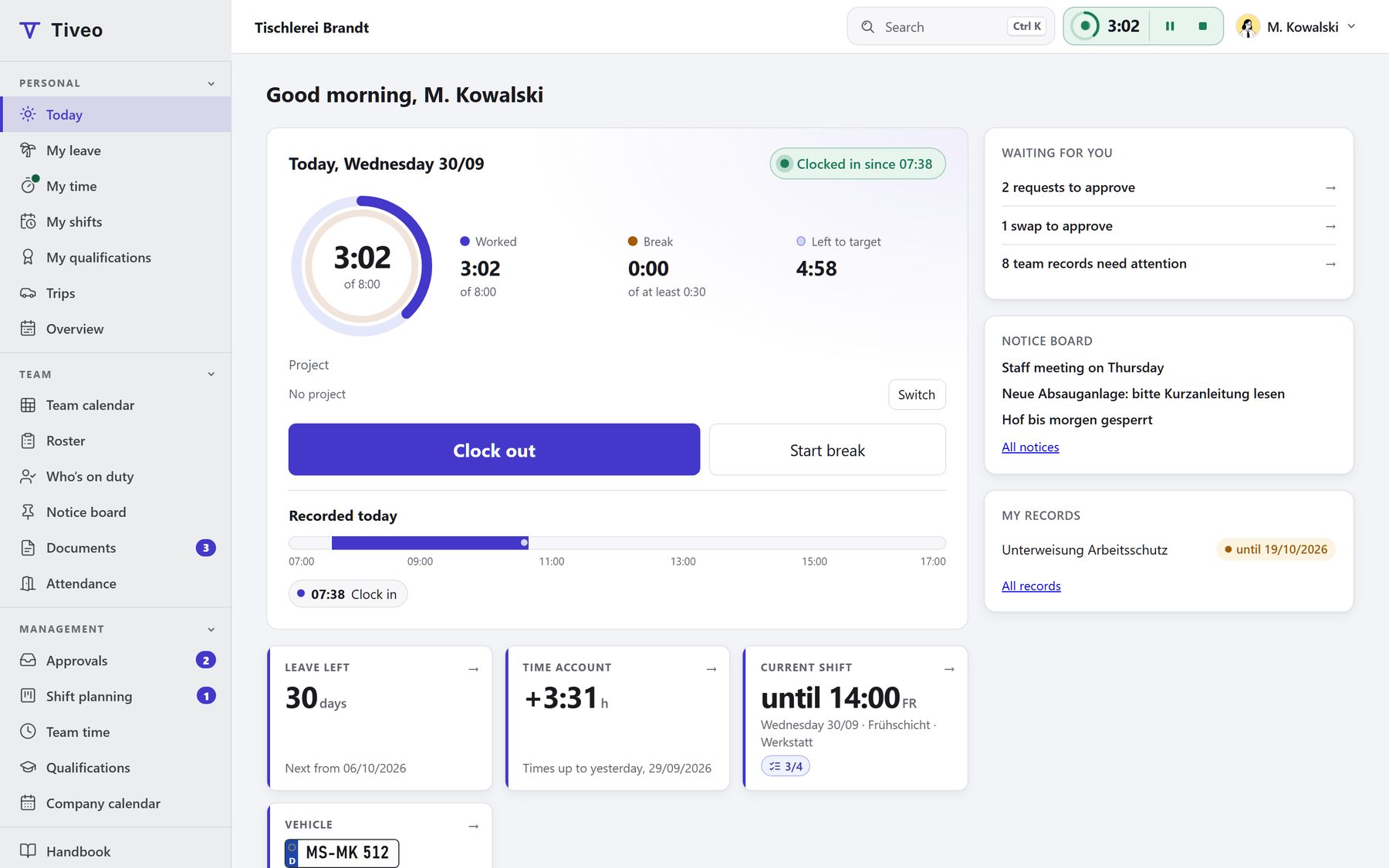
Tiveo is made up of a core every business needs and five modules: absences, time recording, shift planning, qualifications and the vehicle logbook. Absences are always on; add the others when you need them. From Team, every module is in the price.
- All modules included from Team
- Servers in Germany
- Demo without sign-up
Core features
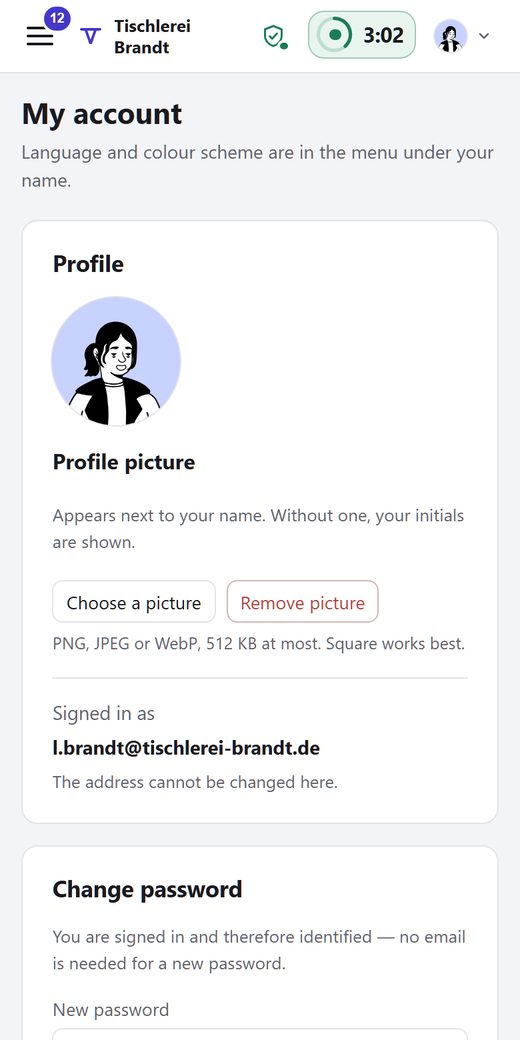
What every company needs: people with and without accounts, structure and roles, public holidays, notice board, documents, data protection and export.
Absences
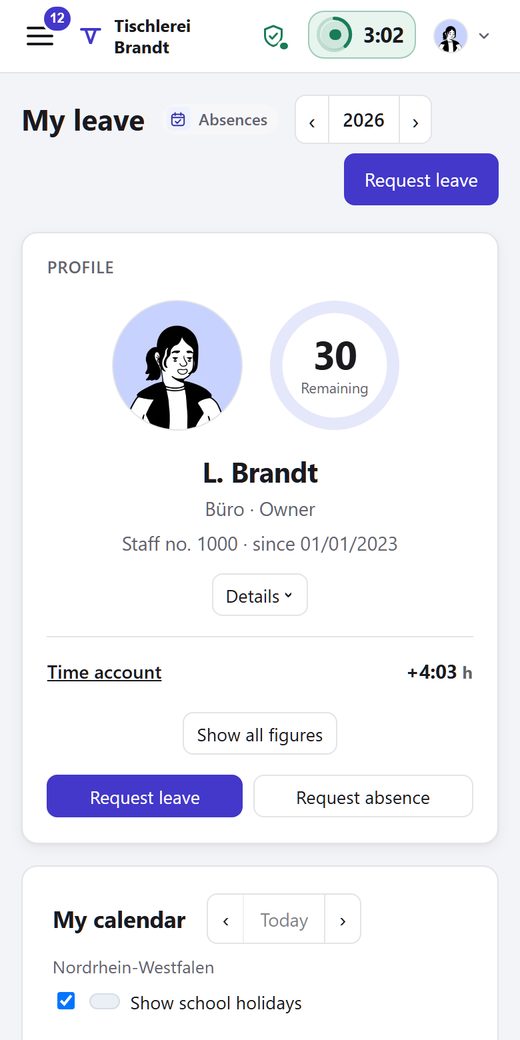
Request and approve leave, calculate remaining leave and part-time, with sick leave and every other absence in one calendar.
Time recording
Record working time in the browser, on the phone or at a terminal, with a time account, Working Time Act checks, a payroll export and project hours if you wish.
Shift planning
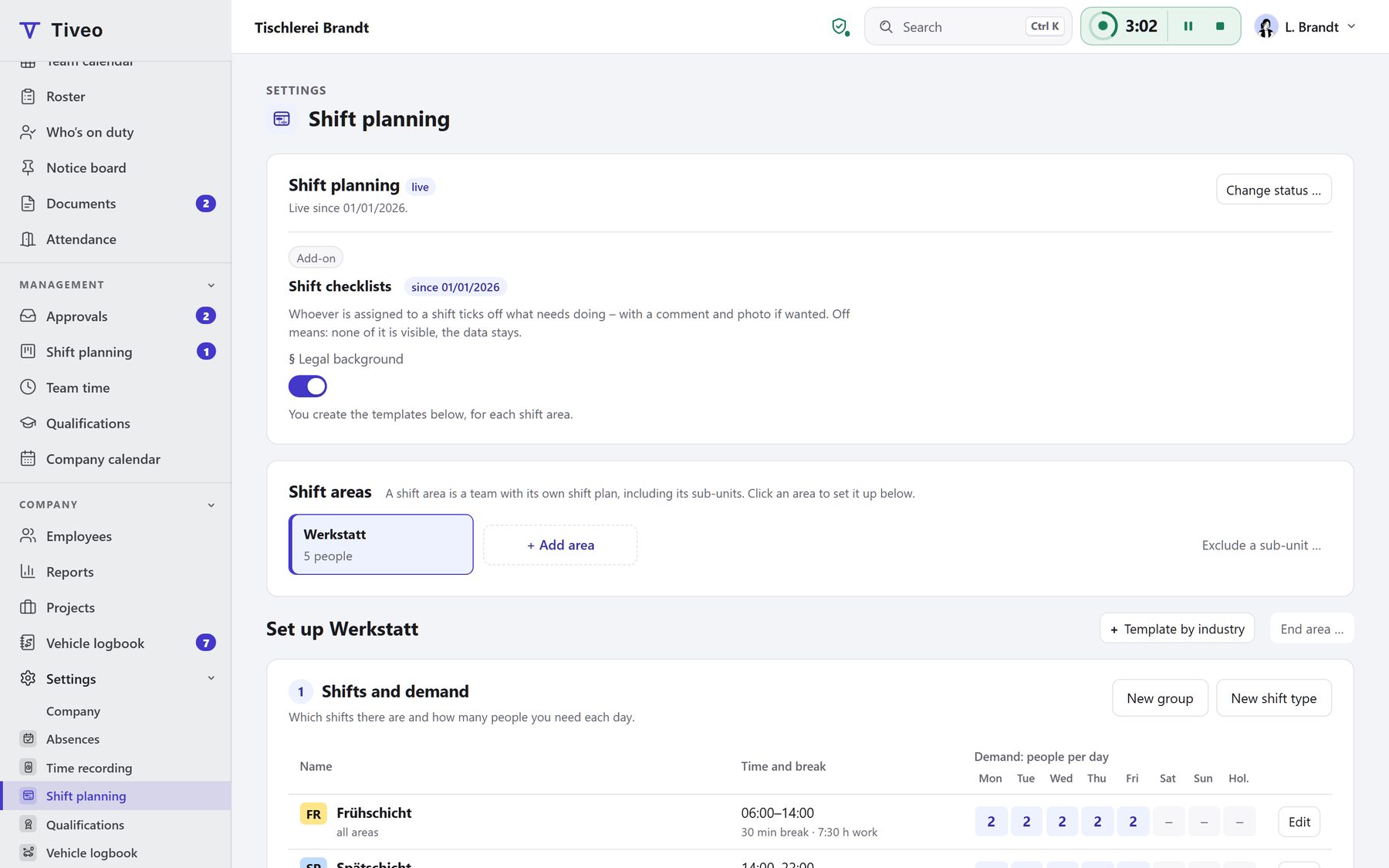
Rosters with demand, a check before publishing, open shifts, swaps and checklists, linked to leave and hours.
Qualifications
Safety briefings, first aiders and training points: who has what, and what runs out soon.
Vehicle logbook
In beta: start trips the way you clock in, with an unbroken odometer chain and every change visible, plus costs and mileage allowance.
How the modules work together
When several modules are on, they share one database. Here is what one event sets off in absences, time recording and shift planning.
| When … | Absences | Time recording | Shift planning |
|---|---|---|---|
| Anna requests leave | Tiveo counts the working days and, before she submits, shows whether a blackout period or staffing stands in the way. | No effect | The request shows what the absence means for her shifts: “Early shift Mon 12 Oct, Workshop: after approval 1 of at least 2”. |
| The leave is approved | The leave account books the days. | The days count as worked. No entry is missing, and the target is met. | Her shifts are cancelled and remain on record. The gap shows in the roster. |
| Jonas calls in sick | Colleagues see “absent”; only managers and HR see the reason. | The day is credited. | His shift is cancelled. The planners offer it as an open shift. |
| Sara takes the open shift | No effect | She clocks in as usual. If her last clock-out was less than eleven hours ago, Tiveo points out the rest period. | Whoever accepts first gets the shift, and the roster is complete again. |
| The October roster goes out | No effect | No effect | Before that, Tiveo checks rest periods and maximum working hours. Afterwards, the people affected are notified and the published version is kept on record. |
The links between the modules have no switch of their own. They come into being as soon as two modules apply to the same person on the same day. Qualifications and the vehicle logbook sit alongside, drawing on the same people and departments; a trip can clock you in.
The core features every module is built on
Who works where, with which rights and on which public holidays is entered once in the core and applies to every module. No module keeps its own staff list.
- People without an account of their own
- Public holidays for 51 states and cantons
- Servers in Germany, data processing agreement to download
Who gets what out of it
“Where do I see what concerns me?”
One sign-in shows your own leave, hours and shifts, at the desk or on your phone.
“Who is on my team?”
Heads see their unit and everything below it. Leading and administering are separate rights.
“Are records and rights correct?”
Add, invite or import people and keep the structure current. Every change is logged.
What is included
Managing people. There are six ways to bring people in, and you can plan for everyone without anyone signing up.
Structure, roles and rights. Departments, teams and sites form a tree, and role and unit decide what each person can see and do.
Holidays, calendars, notice board, documents. Public and school holidays for Germany, Austria and Switzerland, per person by place of work. Plus your company calendar, notice board and documents.
Data protection and export. For each absence type you decide who sees the reason. You can download all your data at any time, on the free plan too.
Your look. Your company’s logo and brand colour in your people’s view. The calendar colours stay the same, so leave looks like leave everywhere.
More: tiveo.de/en/basisfunktionen
Online leave planner: from request to remaining leave
In many businesses, leave runs on a paper or email request, a list of days left and the wall planner in the corridor. Tiveo brings that together and gets right what is often worked out wrongly.
- Pro rata under § 5 BUrlG
- Reminder before leave expires, sending recorded
- Public holidays per person by place of work
Who gets what out of it
“How many days do I have left?”
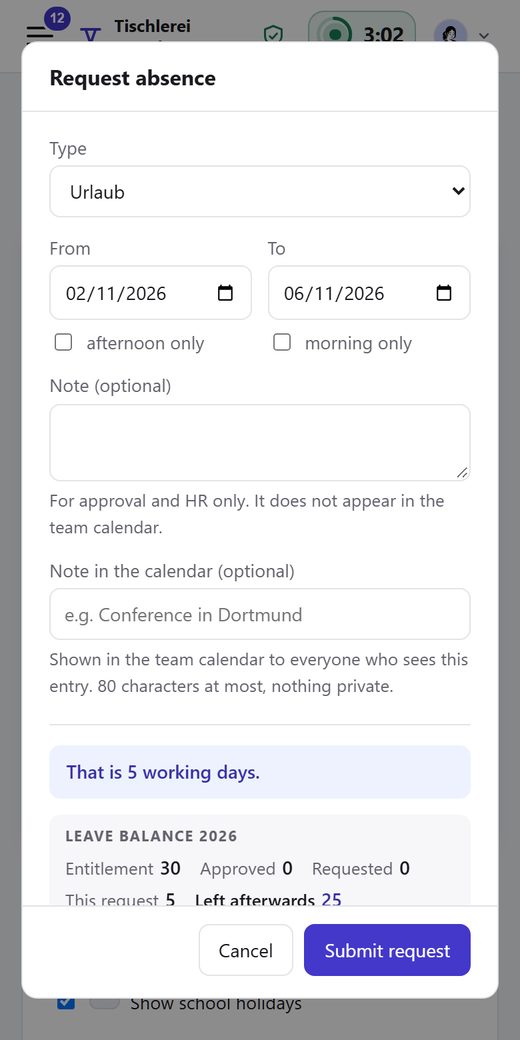
The request takes two clicks and shows your remaining days, who approves and who else is off.
“Who else would be away?”
Every pending request on one page, the team beside it and the leave left afterwards.
“Do the numbers add up at year end?”
Every figure in the leave account shows where it comes from.
What is included
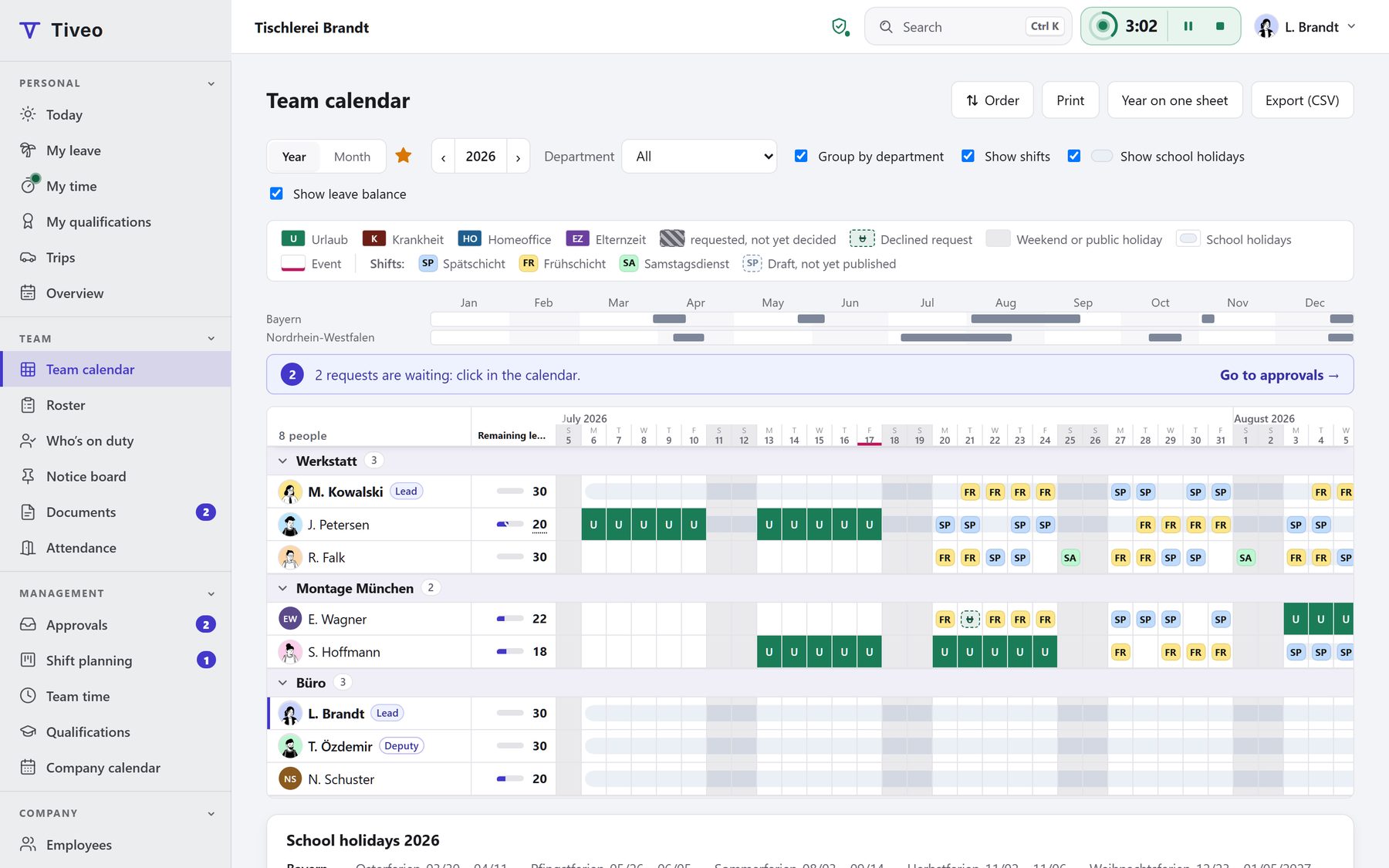
Request and approval. Tiveo counts the working days with weekends, the holidays of the person’s region and their part-time pattern. Anything in the way shows before sending.
Entitlements and remaining leave. Entitlement, carry-over, special leave and extra days, including the cases people often get wrong.
Approval rules. You decide who approves whose leave: by length, absence type, department or person, in several steps if needed. For example, the department head approves up to five days and the division head joins from six.
Team calendar and company calendar. Rows are people and columns are days, with public and school holidays, events and, with shift planning, the shifts.
Sick leave and BEM. Sick notes sit in the same calendar, but only managers and HR see the reason.
More than holidays: absence types. Tiveo comes with 12 templates, each with its own colour, abbreviation and rules: whether it counts against the entitlement, needs approval or needs proof. From the Team plan you add as many of your own as you like.
More: tiveo.de/en/urlaubsverwaltung
Time recording without surveillance
Since the Federal Labour Court’s decision of 13 September 2022, employers in Germany have to record their employees’ working time. Tiveo turns that into a time clock in the browser and on the phone, a time account and a payroll export. It stores no locations or fingerprints. Only people you allow can see who is in right now.
- Entries cannot be changed silently
- Every correction with a name and a reason
- Neither GPS tracking nor biometrics
Who gets what out of it
“How many hours have I done this week?”
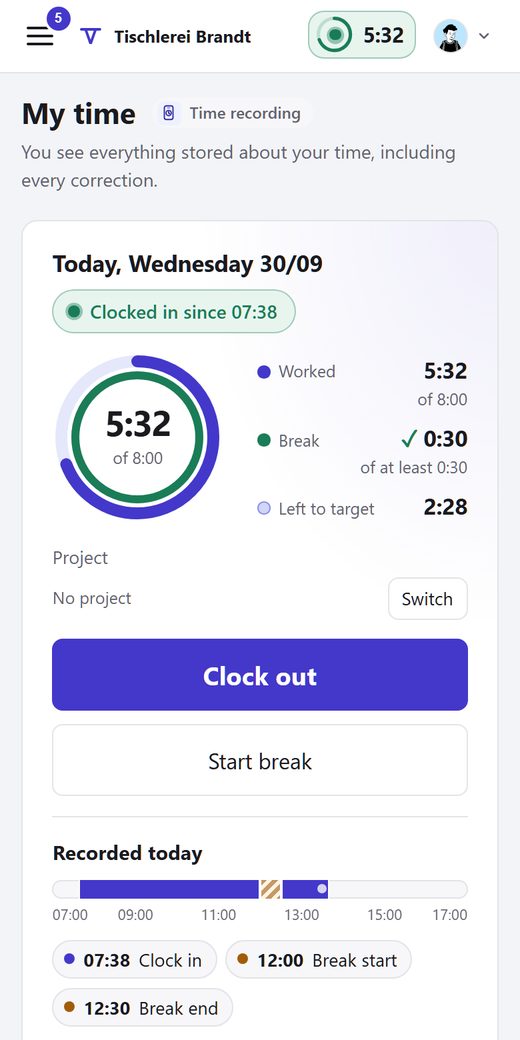
Clock in, break, clock out with one tap. Every entry and every correction by others shows with a reason.
“Do my team’s hours add up?”
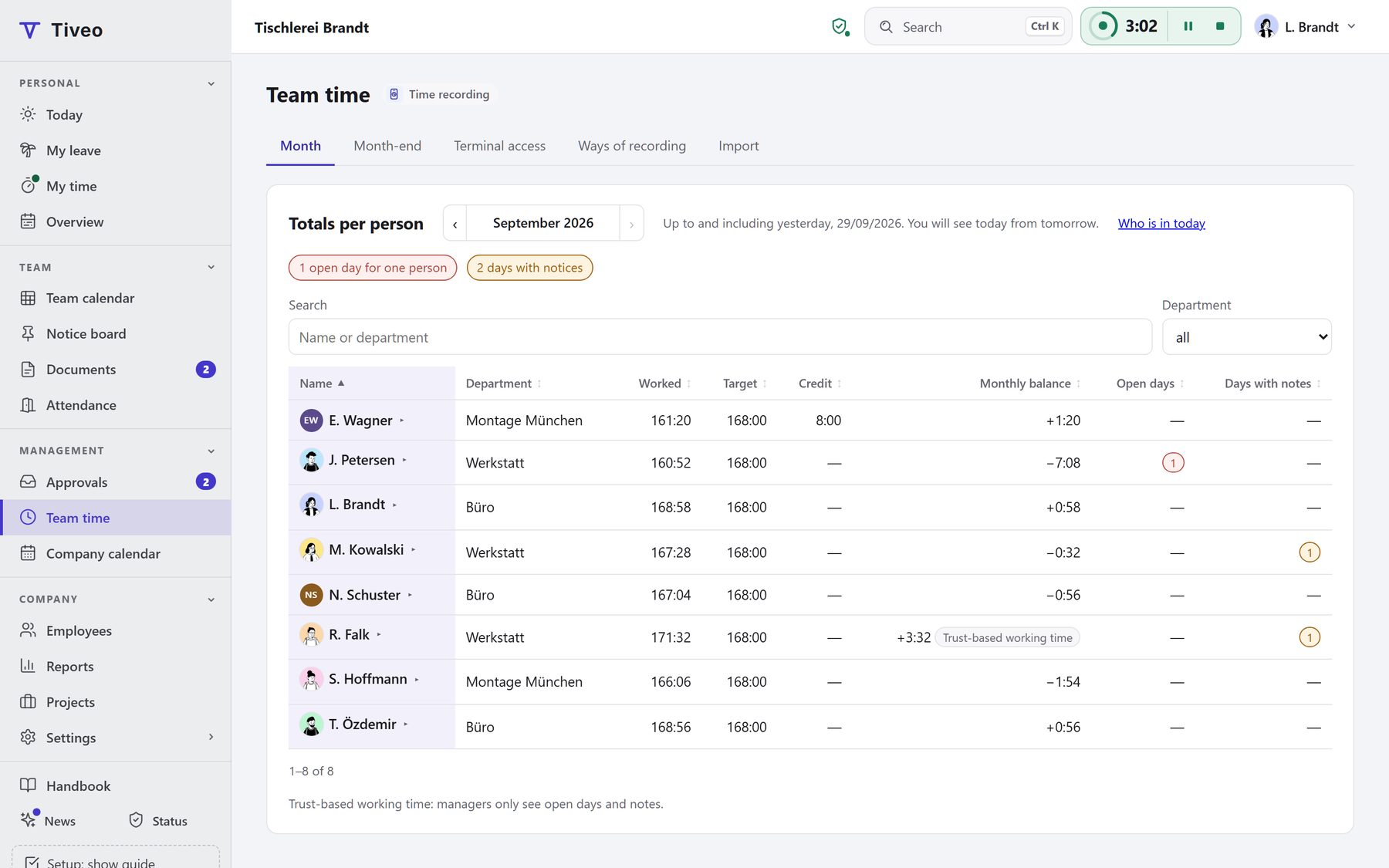
Team time shows totals per person. Who came in when is deliberately not shown as a list.
“What goes to payroll?”
One month per person with target, actual, balance and premium hours, every export kept on record.
What is included
Clock in on browser, phone or terminal. Clock in, break and clock out, several times a day if needed. Anyone without a device of their own uses the tablet at the entrance with a PIN or badge.
Late entries and corrections. An entry is never overwritten. A correction adds a new one, and the old one stays visible in the history.
Time account. Target from weekly hours, actual from the entries, credit for leave and sick days. The balance is fixed every day.
Working Time Act checks. Tiveo checks every day for breaks, maximum hours and rest periods and shows what doesn’t fit. Nothing is blocked, because the record shows what happened.
Split hours across projects. Anyone visiting several customers a day splits the time across projects. The office sees per project who booked how much and when.
Month-end and payroll export. Under Team time › Month-end: check, print the timesheets, close the month. That keeps a version of the payroll export, with date, name and premium hours.
More: tiveo.de/en/zeiterfassung
Duty rosters and shift planning, checked before you publish
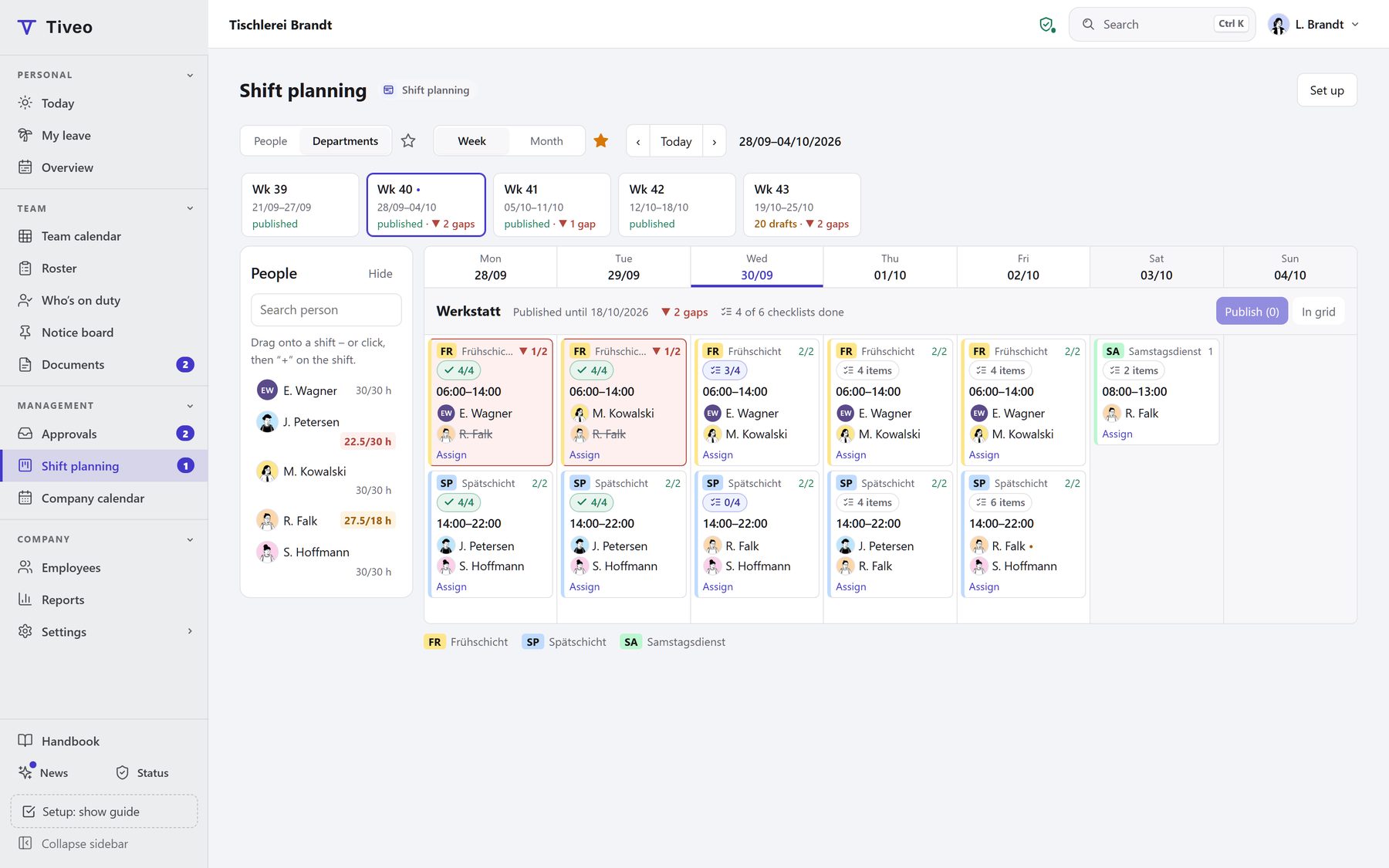
In shift work, whether leave can be approved depends on how the shifts are staffed. That is why leave and the roster are linked in Tiveo: anyone requesting leave sees the consequences for the roster, and approved leave takes the shift out without deleting it.
- Demand per shift: min, target, max
- Rest and maximum hours checked before publishing
- No double booking, not even across areas
Who gets what out of it
“When am I working next week?”
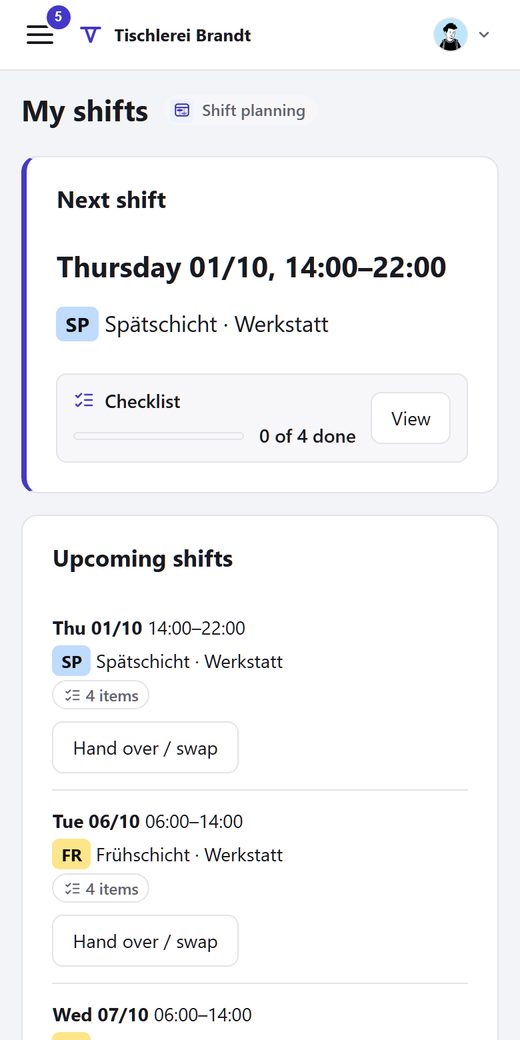
“My shifts” shows the coming weeks. Swapping, giving away and entering wishes works from the phone.
“Is every shift covered?”
The grid shows the staffing per shift against min, target and max, plus absences and wishes.
“Who plans, and by which rules?”
For each shift area you set shift types, demand and planners. Leave is decided by the manager.
What is included
Planning grid and demand. Week or month, by people or by departments. Each shift shows how many are scheduled, measured against min, target and max per weekday and public holiday.
Check and publish. The check report lists violations, warnings and notes, using the same values as time recording. Publishing is one button, and the version is kept on record.
Wishes, open shifts and swaps. Every shift area plans the way it suits it: the manager plans, wish-based planning, self-scheduling or a fixed rotation. If someone is missing, whoever accepts first takes over.
Checklists per shift. What needs doing in a shift is listed on the shift. The people on it tick items off on their phone, with a comment and photo if needed.
Leave with staffing in view. The leave request and the approval show what the absence means for the shifts: “Early shift Mon 12 Oct, Workshop: after approval 1 of at least 2”.
Duties, on-call and payroll. Emergency and on-call duty visible to everyone if you like: who is on duty right now, until when and who comes next. For payroll, Tiveo counts the duties per month.
More: tiveo.de/en/dienstplan
Qualifications and safety briefings: who has what and what expires
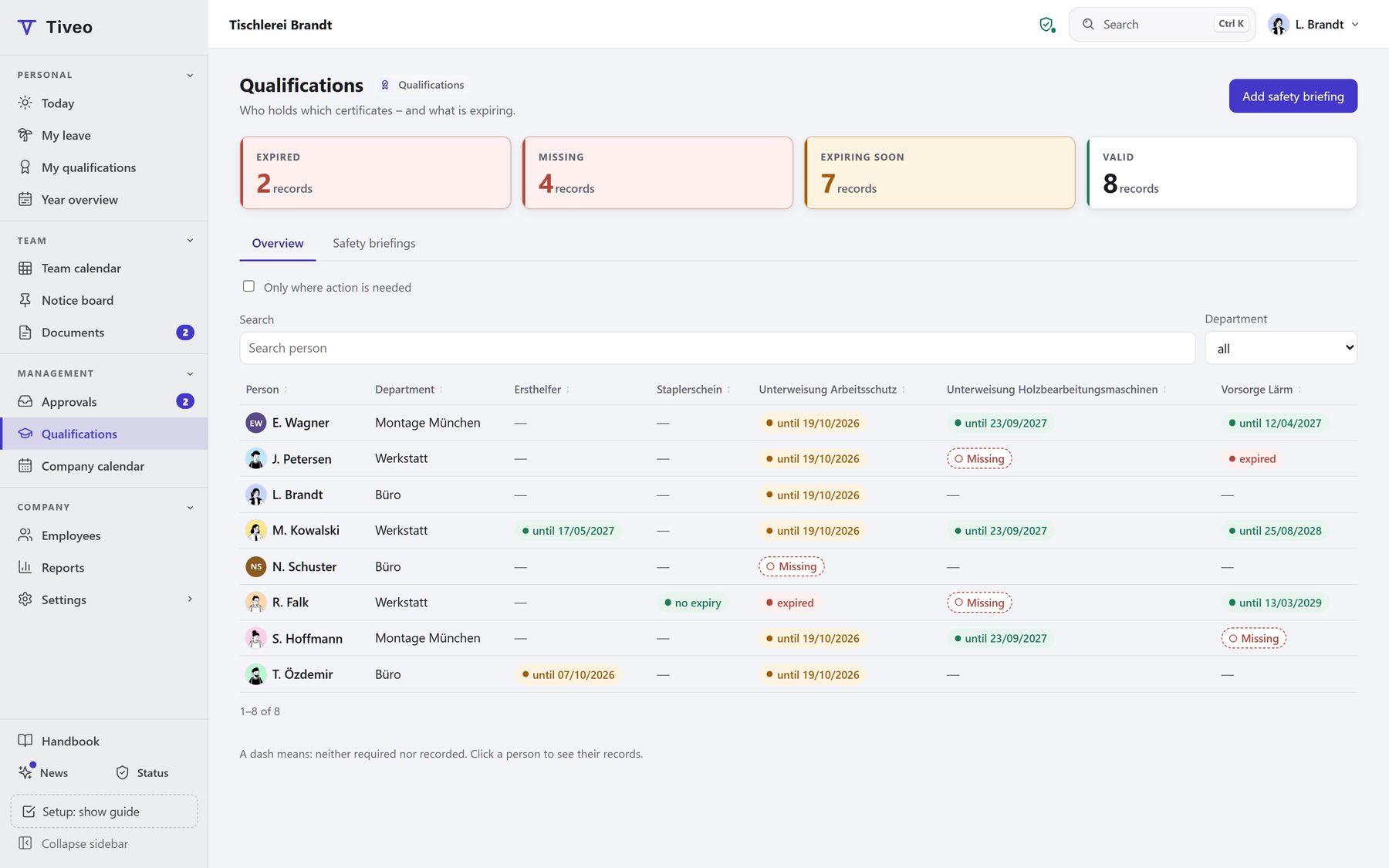
First aiders, forklift licences, the yearly safety briefing, training points: Tiveo shows for each person what is valid, what expires soon, what is missing and who has confirmed a briefing.
- Status per person and type: valid, expiring soon, expired, missing
- Briefings confirmed in the app or recorded on paper
- Medical checks with the date only, never a finding
Who gets what out of it
“What do I have to prove, and by when?”
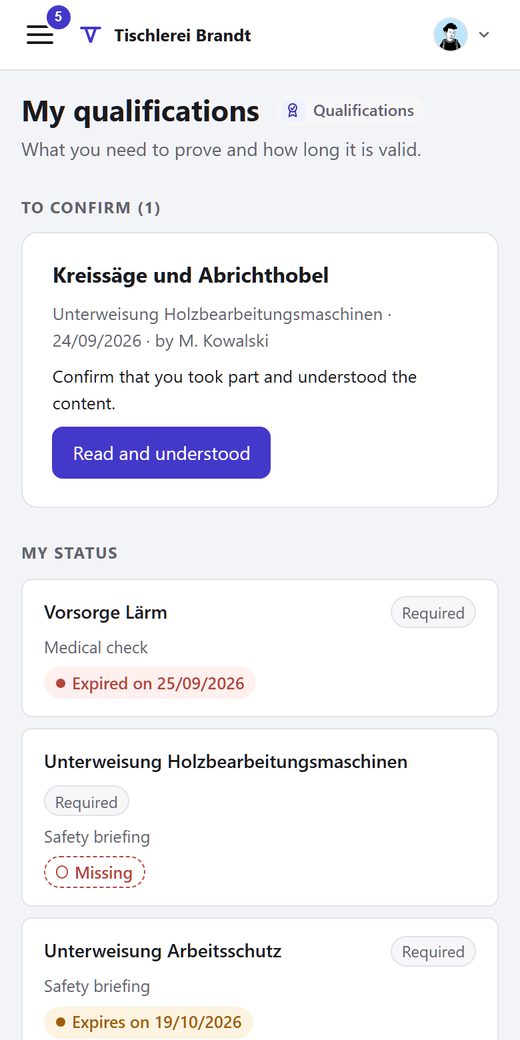
“My qualifications” shows your own status. You confirm briefings there and add training yourself.
“Is my team up to date?”
The overview shows your own people: what is valid, what expires soon, what is missing.
“Which records do we keep?”
Create types with deadlines and requirements and record briefings for all employees.
What is included
Overview: who has what. People in rows, types in columns. Each cell shows the status: valid, expiring soon, expired or missing.
Briefings with confirmation. Enter date, topic and “given by” once. Everyone who needs the briefing is preselected.
Types, deadlines and requirements. Five categories: qualification, safety briefing, training, medical check and instruction. Per type you set the deadline, the warning and who needs it.
Training points over a period. Points within a period, such as 60 points in four years in physiotherapy. Counted backwards from today.
Templates per industry. Construction and scaffolding, medical practice, physiotherapy, care, hospitality or general: the template creates the usual types, adding only what is missing.
Who sees what. Employees see their own records, managers their team, HR everyone. For medical checks only the date is kept, never a finding.
More: tiveo.de/en/qualifikationen
Electronic vehicle logbook: start trips like clocking in · Beta
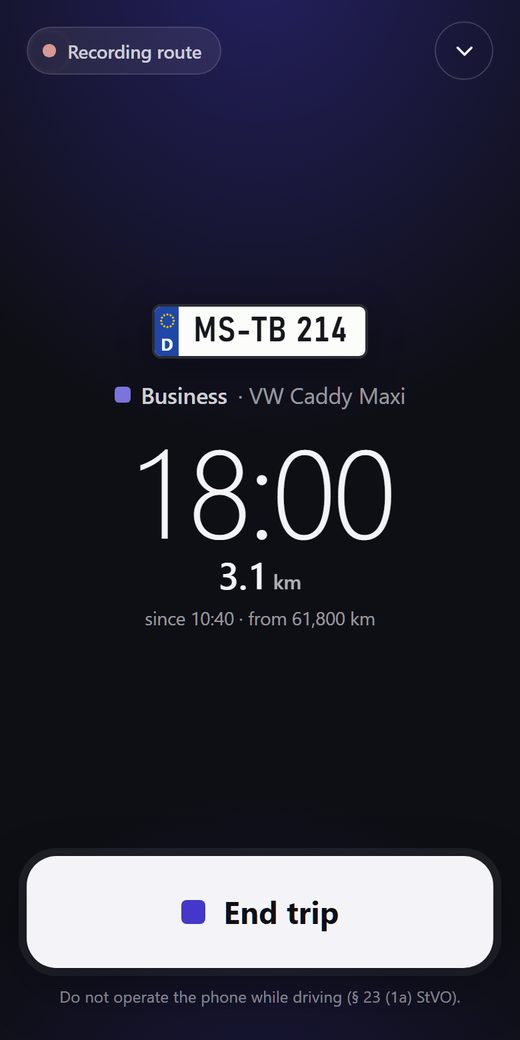
One tap starts the trip, vehicle and odometer already filled in. Add the purpose later; the yearly logbook per vehicle is built to the requirements for electronic logbooks.
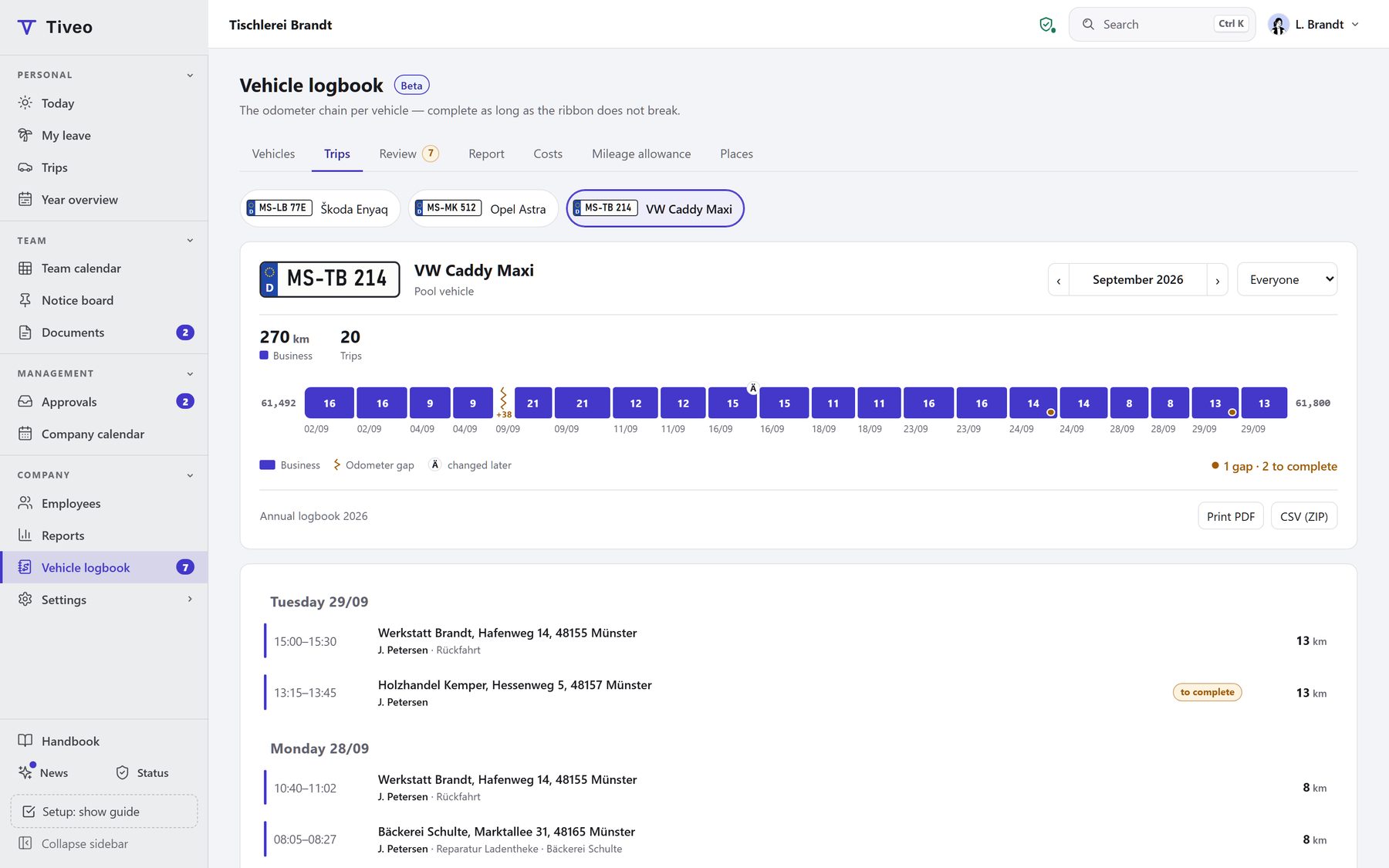
- Unbroken odometer chain: no jump without a reason, none backwards
- Every change is a new version, visible in the logbook
- Route only if you want it, never on private trips
Who gets what out of it
“Do I have to write everything down now?”
No. Destination and purpose can wait until after the trip, by default for seven days.
“Who takes the van tomorrow?”
In the roster, each shift gets a pool vehicle. If it is booked twice, Tiveo warns you.
“Is our logbook complete?”
The check shows odometer gaps, missing details and missing driving licence checks.
What is included
Start a trip like clocking in. One tap starts the trip, one ends it. Vehicle and odometer are prefilled.
Complete by a deadline. Add destination, purpose and partner after the stop. “To complete” lists what is missing. The deadline is seven days by default.
Yearly logbook per vehicle. One logbook per vehicle and year, to print or save as PDF, private trips with kilometres only. Changed trips show their history right in the logbook.
Costs, receipts, mileage allowance. Snap fuel and charging receipts, add servicing and leasing: Tiveo works out the cost per kilometre.
Pool, company and private cars. Each vehicle with plate, drivers over time and inspection dates.
Route only if you want it. Switched on, the app records the route of business trips as evidence next to the odometer. Off by default.
More: tiveo.de/en/fahrtenbuch
For everyone at work
Employees
Request leave, clock in, see and swap shifts, on the phone or at the computer.
Managers
Before approving a request, they can check the team calendar for who else is off.
HR
Tiveo works out remaining leave, hour balances and the payroll export. Every change is logged.
How to get started
- Create an accountIt’s free and needs no payment details. Sample data is optional.
- Add your peopleType the names, paste a list or upload the Excel leave planner’s workbook.
- Choose rules and modulesDecide once who approves and which holidays apply.
- Invite your teamBy email or join link. Planning works without accounts, too.
Prices
| Plan | Free | Team | Business | Company |
|---|---|---|---|---|
| Employees | up to 5 | up to 15 | up to 50 | up to 100 |
| Price per month | €0 | €19 | €59 | €119 |
Absences and shift planning come with every plan, the other modules from Team. You pay by headcount, and up to 5 it's free. Net price, cancellable at the end of any paid month.
Try it free for a month
Data protection
Template works agreement · Privacy notice for the vehicle logbook · Data processing agreement · Technical and organisational measures · Deletion policy: tiveo.de/en/sicherheit
Try it
See the demo
No sign-up, with sample data
app.tiveo.de/demo
Start for free
No payment details
app.tiveo.de/registrieren