Skip to content
DE

Shift planning module

Duty rosters and shift planning, checked before you publish

In shift work, whether leave can be approved depends on how the shifts are staffed. That is why leave and the roster are linked in Tiveo: anyone requesting leave sees the consequences for the roster, and approved leave takes the shift out without deleting it.

  • Demand per shift: min, target, max
  • Rest and maximum hours checked before publishing
  • No double booking, not even across areas
3 values per shift: min, target, max
11 h rest period, checked before publishing
Included in the price in every plan, at no extra cost

What each role asks

Employees

“When am I working next week?”

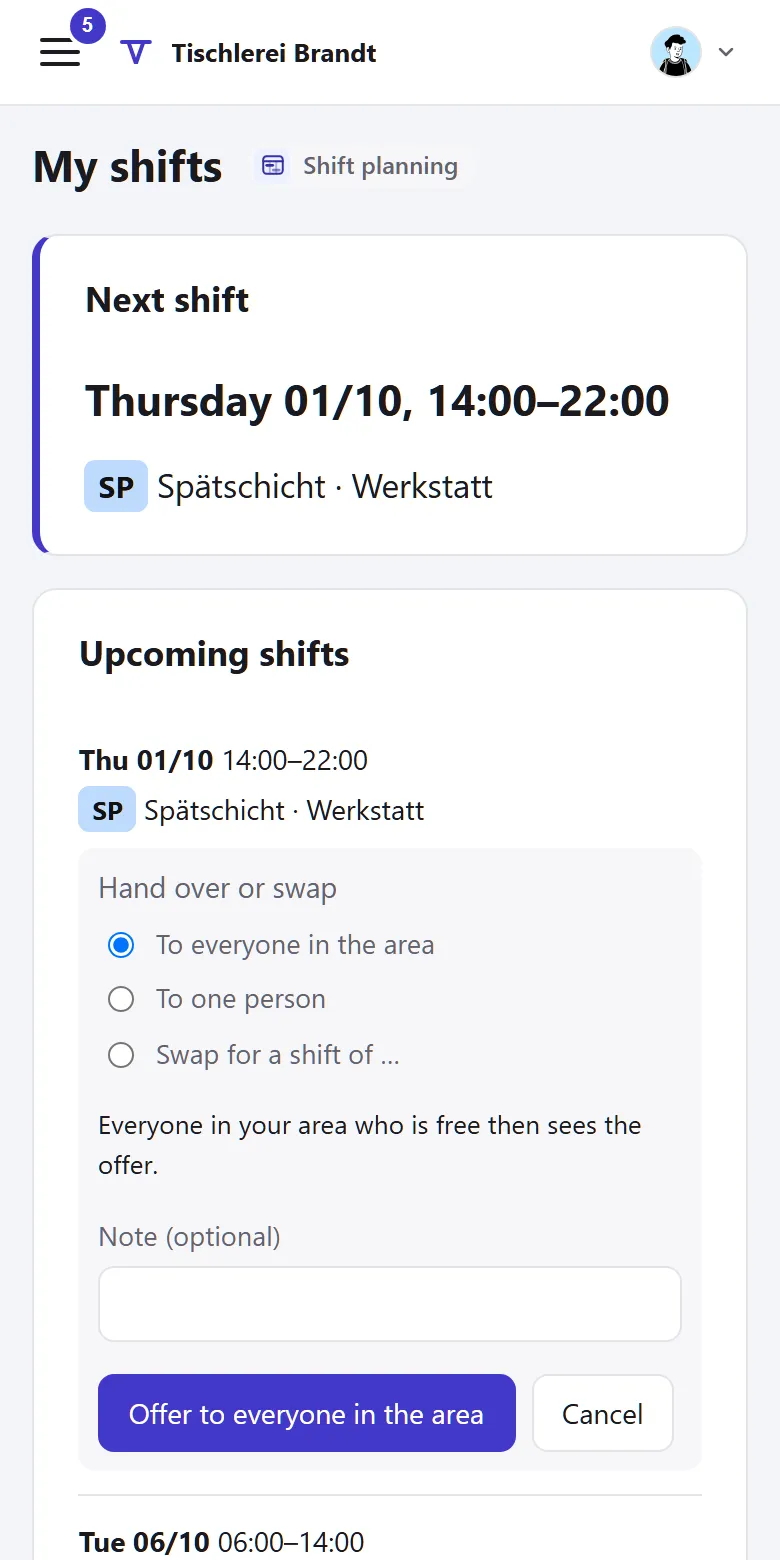
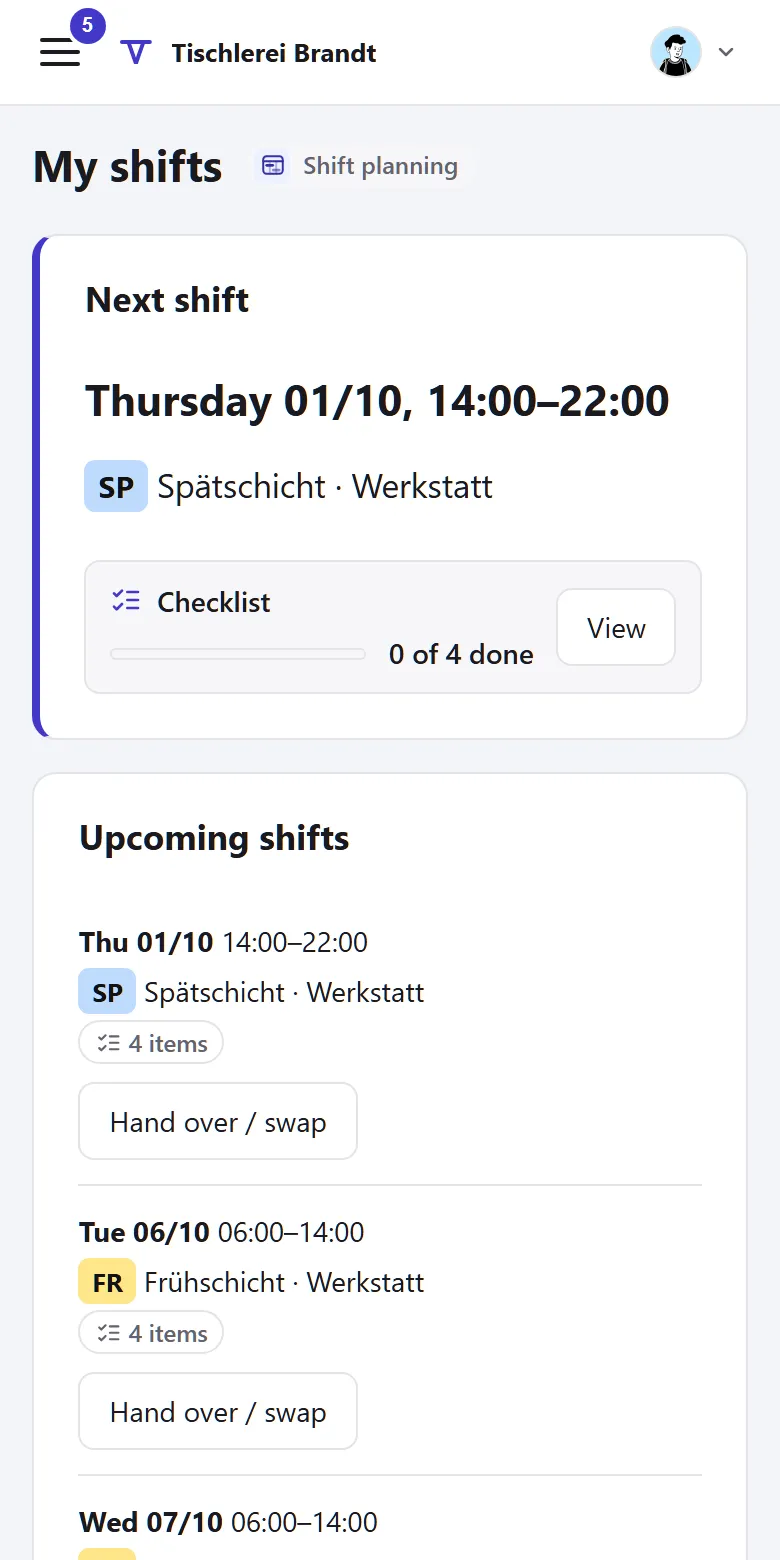
“My shifts” shows the coming weeks. Swapping, giving away and entering wishes works from the phone.

Planners

“Is every shift covered?”

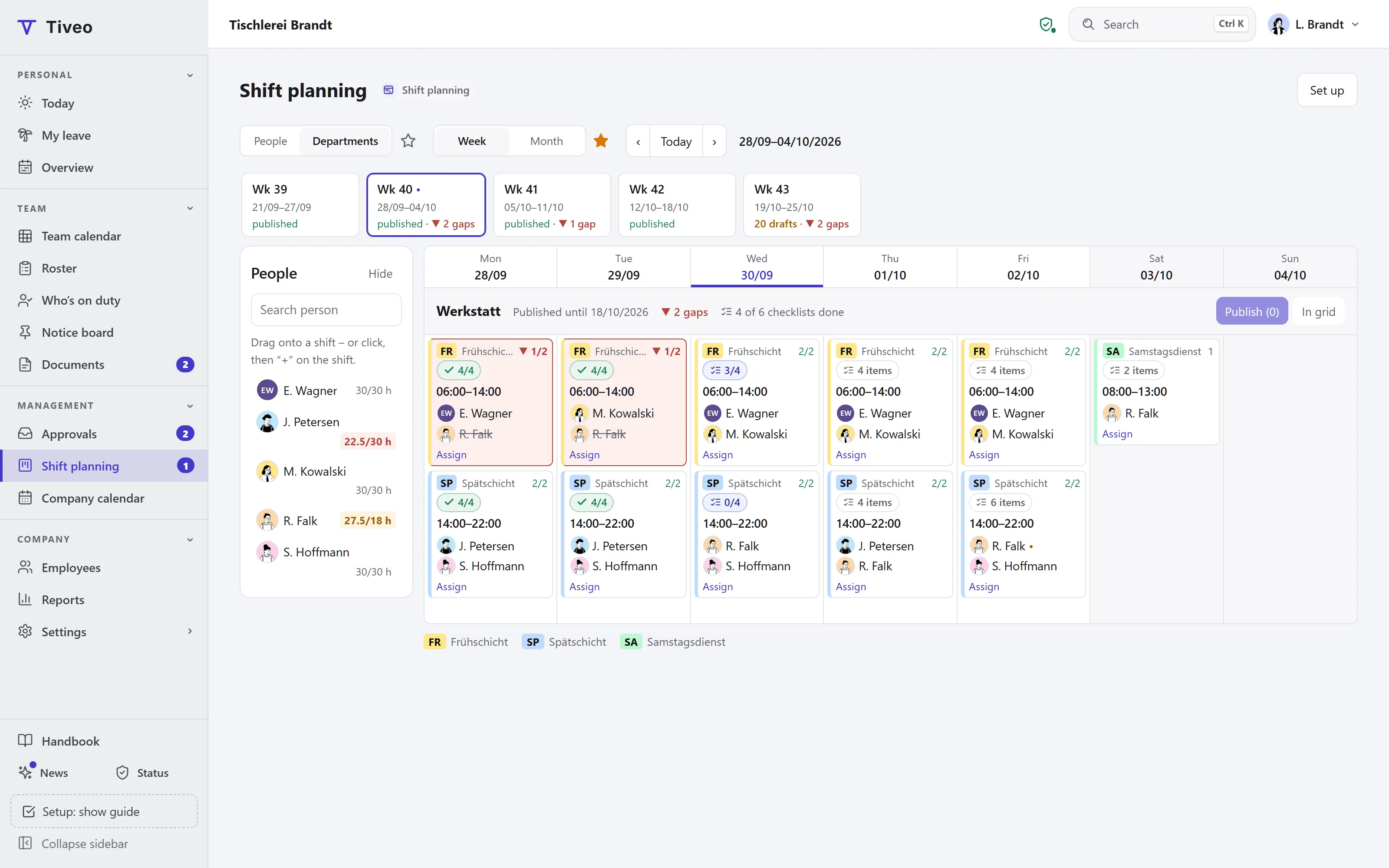
The grid shows the staffing per shift against min, target and max, plus absences and wishes.

HR and administration

“Who plans, and by which rules?”

For each shift area you set shift types, demand and planners. Leave is decided by the manager.

How a roster comes together in Tiveo

  1. Plan

    Place shifts in the grid as a draft. Demand, approved absences and wishes are already in.

  2. Check and publish

    The check report names breaches of rest periods and maximum working time. Only then does the roster apply.

  3. Swap and step in

    Give shifts away, swap them or take open ones. Whether planners have to agree is up to you.

What shift planning does

Tiveo checks every roster against the Working Time Act before you publish it.

Planning grid and demand

Week or month, by people or by departments. Each shift shows how many are scheduled, measured against min, target and max per weekday and public holiday.

  • “Departments” view: shifts as cards, drag a person onto a shift
  • Move several shifts at once to other days or people
  • Shifts past midnight and duties lasting 24 hours
  • One shift type for several teams or individual people
  • Double booking is ruled out, even across areas
  • Save a planned week as a template and carry it over for months
Check and publish

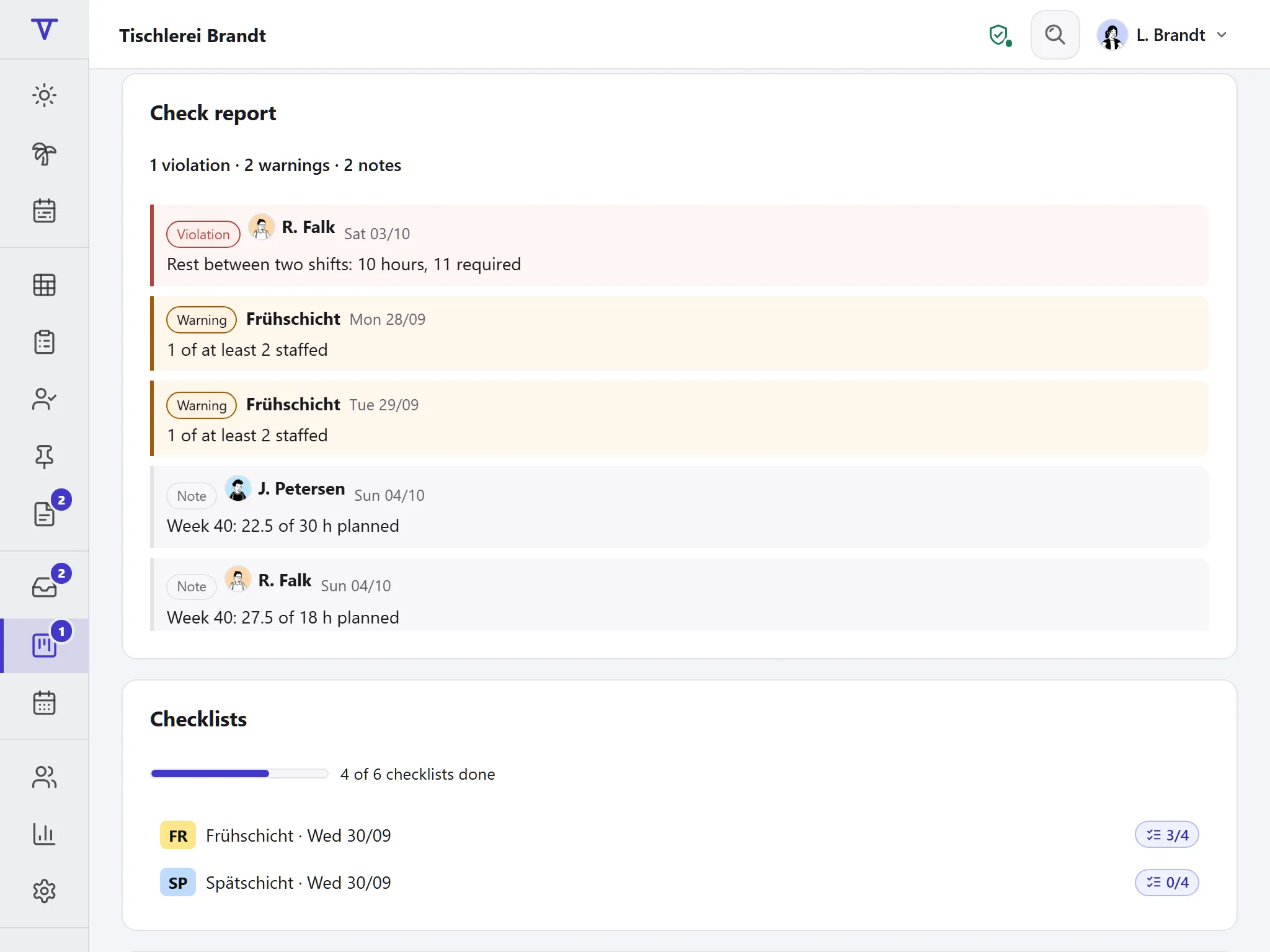
The check report lists violations, warnings and notes, using the same values as time recording. Publishing is one button, and the version is kept on record.

  • Rest period, maximum working time and break per duty
  • More than six days or three nights in a row
  • Protective rules for young people and during maternity protection
  • Shift types can require a qualification, and the check warns if it is missing
  • Required staffing by time, department or qualification; gaps are violations
  • Email to the people affected from Team, if you like

Wishes, open shifts and swaps

Every shift area plans the way it suits it: the manager plans, wish-based planning, self-scheduling or a fixed rotation. If someone is missing, whoever accepts first takes over.

  • Wishes such as “free” or “not this shift”, important ones with a star
  • Give shifts away or swap one for one; taking one is voluntary
  • Approval by the planners or valid at once, shortly before the start always with approval
  • A whole on-call week given away or swapped in one step
  • Templates per industry as a starting point

Checklists per shift

What needs doing in a shift is listed on the shift. The people on it tick items off on their phone, with a comment and photo if needed.

  • Templates per shift type and weekday, plus items for single shifts
  • A photo as proof where it matters
  • Progress shows on every shift in the roster and on “Today”
  • An add-on from Team: only visible once you switch it on

Leave with staffing in view

The leave request and the approval show what the absence means for the shifts: “Early shift Mon 12 Oct, Workshop: after approval 1 of at least 2”.

  • Once approved, the shift is cancelled and stays on record
  • Only the manager sees a sickness reason
  • No shift during an approved absence

Duties, on-call and payroll

Emergency and on-call duty visible to everyone if you like: who is on duty right now, until when and who comes next. For payroll, Tiveo counts the duties per month.

  • Weekdays, Saturdays, Sundays and public holidays separately, as CSV
  • Employees report their duties each week, pre-filled from the roster
  • Calendar feed with shift times for Outlook and Apple Calendar

How shift planning works with the other modules

  • With absences Consequences in the request, cancellation on approval; open leave requests appear in the check report.

  • With time recording Rest periods and maximum working time use the same values; roster and recorded time sit side by side.

  • From the core A shift area is a unit. Anyone employed there can be scheduled, even without an account.

The law of the roster

What a roster has to observe and who has a say in it.

What applies, where it is written and what Tiveo does with it
  1. Working time must not exceed eight hours a working day; up to ten hours are allowed if the average over six months does not exceed eight hours.

    § 3 ArbZG

    In Tiveo: Duties above the maximum you set (ten hours by default) appear in the check report.

  2. There are at least eleven hours of rest between two duties. In hospitals, care and hospitality, for instance, it may be up to one hour shorter if another rest period in the same month or within four weeks is extended to twelve hours.

    § 5(1) and (2) ArbZG

    In Tiveo: The roster check reports shorter rest periods. You set a shorter value with a legal basis.

  3. Night work is work of more than two hours between 11pm and 6am, in bakeries between 10pm and 5am. It must be organised according to established findings of occupational science.

    § 2(3) and (4), § 6(1) ArbZG

    In Tiveo: More than three night duties in a row appear as a note in the check report.

  4. Young people may work at most eight hours a day and need twelve hours off between two working days.

    §§ 8 and 13 JArbSchG

    In Tiveo: If the protective attribute is set for the person, Tiveo checks the stricter rules. Planners only see a neutral note, never the attribute.

  5. The works council has a say in the start and end of daily working time and its distribution over the week, and so in the roster.

    § 87(1) no. 2 BetrVG

    In Tiveo: Nobody but the planners sees drafts. The published roster is binding, and its version is kept on record.

As of 26 September 2026. These sentences summarise the legal position and are not legal advice. Collective agreements and works agreements may provide otherwise.

Included in the price

Shift planning costs nothing extra: it is included in every plan, the checklists from Team. What sets the plans apart is in the price table.

All plans and features compared →

Plan FreeTeamBusinessCompany
Employees up to 5up to 15up to 50up to 100
Price per month €0€19€59€119
Shift planning ✓ ✓ ✓ ✓

Common questions

If your question isn’t here, ask the developers directly.

Ask a question
What is the difference between a duty roster and a shift plan?

Day to day, none: both mean the plan of who works when. “Shift plan” stresses fixed shifts such as early, late and night; “duty roster” is common in care, hospitals and emergency services. In Tiveo the module and its page are both called Shift planning.

Do employees see the roster before it is finished?

No. Only planners see drafts. Employees see their shifts once the roster is published, and from then on it applies.

What happens to a shift when someone falls ill?

The shift is cancelled: it remains on record with a reason only the manager sees, and no longer counts towards staffing. The planners then offer it as an open shift; taking it is voluntary.

Can we swap shifts without asking the planners?

If your company sets it up that way, yes. The default: the planners agree, and always in the last 48 hours before the start.

Does Tiveo plan automatically?

No. Tiveo checks, calculates and shows the consequences; people do the scheduling. Planners can apply a fixed rhythm as a pattern, which creates drafts for them to check and publish.

Plan it yourself

The demo opens on the shift planning of a workshop running two shifts, with grid, demand, check report and “My shifts”, and no sign-up.