Industries Care
Care rosters: requests, rest periods, staffing
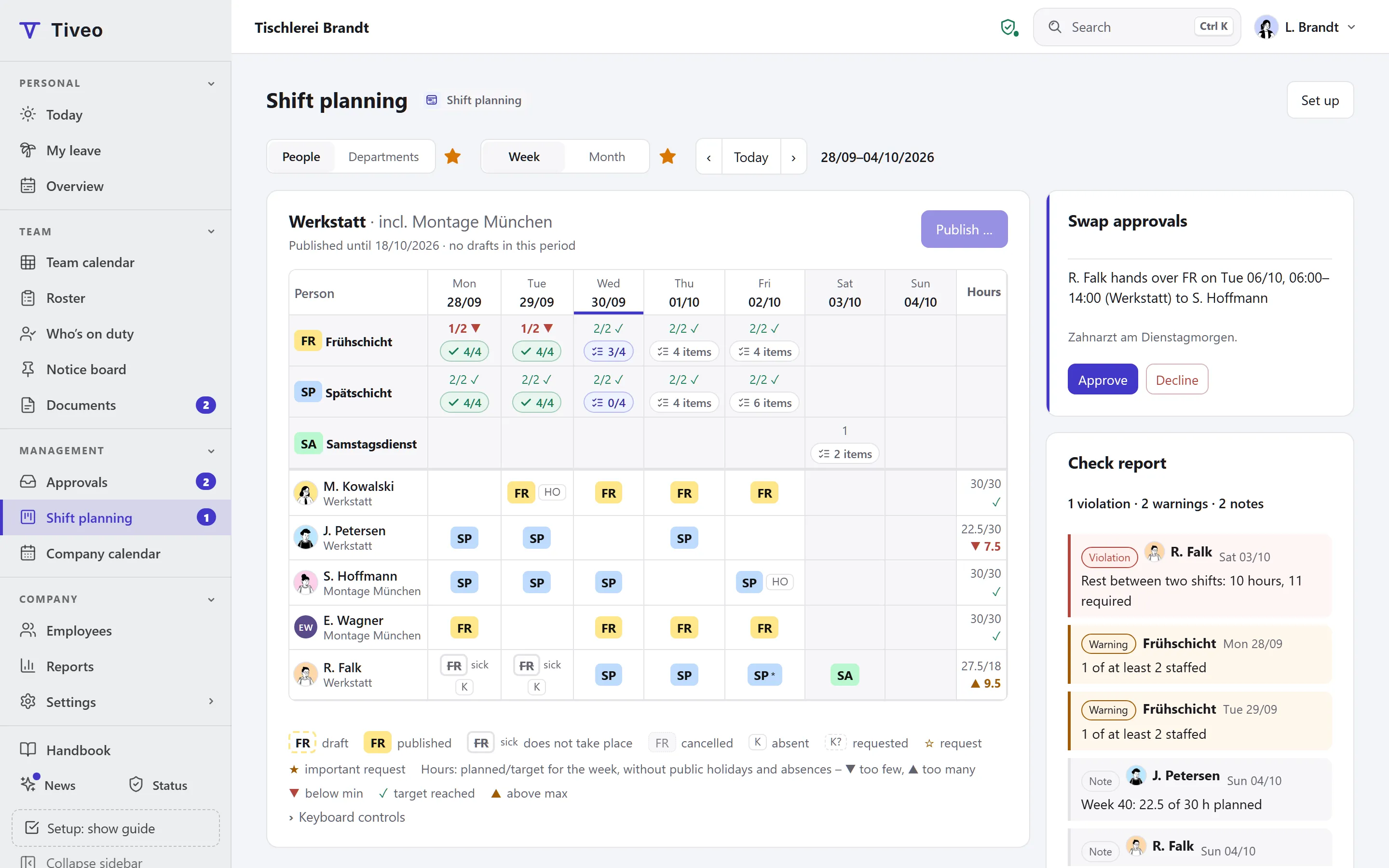
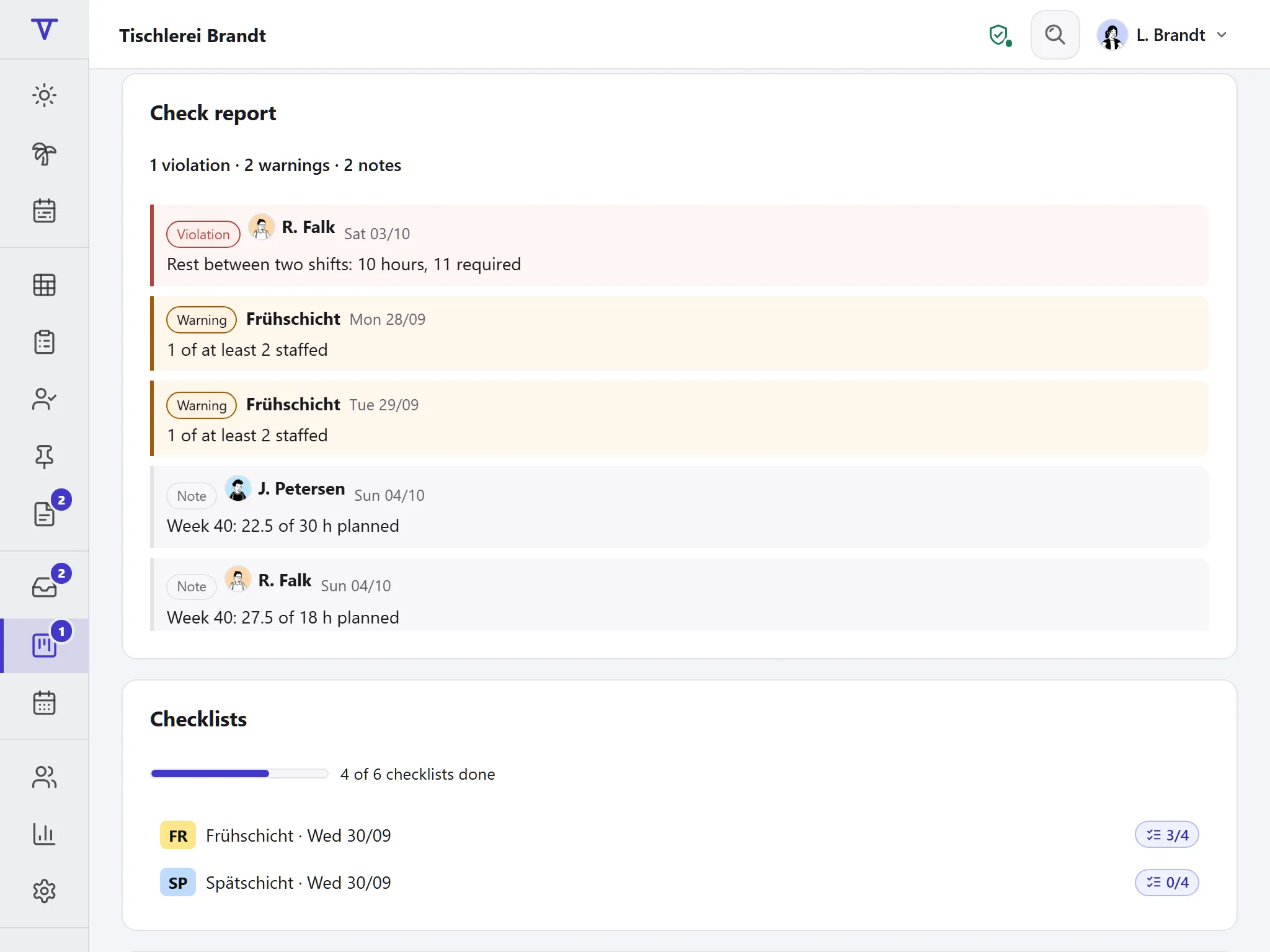
In care, every duty has to be covered, and shift workers want a say in when they work. Staff send requests up to four weeks ahead. Before you publish, Tiveo checks rest periods and nights in a row, and each leave request shows what it means for staffing.
- Template with early, late and night duties
- Requests up to four weeks ahead
- Checks on rest periods and nights in a row
Recommended planning method
Request-based plan
Employees send requests up to four weeks ahead; planners assign shifts and see them while doing so.
Carers work weekends, public holidays and nights. Up to four weeks ahead, each person can ask for a day off or rule out a shift, so everyone sees who gets the unpopular duties. Planners still assign and only publish once the check report is clean.
- Requests on
- Self-scheduling off
- Open shifts on
- Fixed cycle off
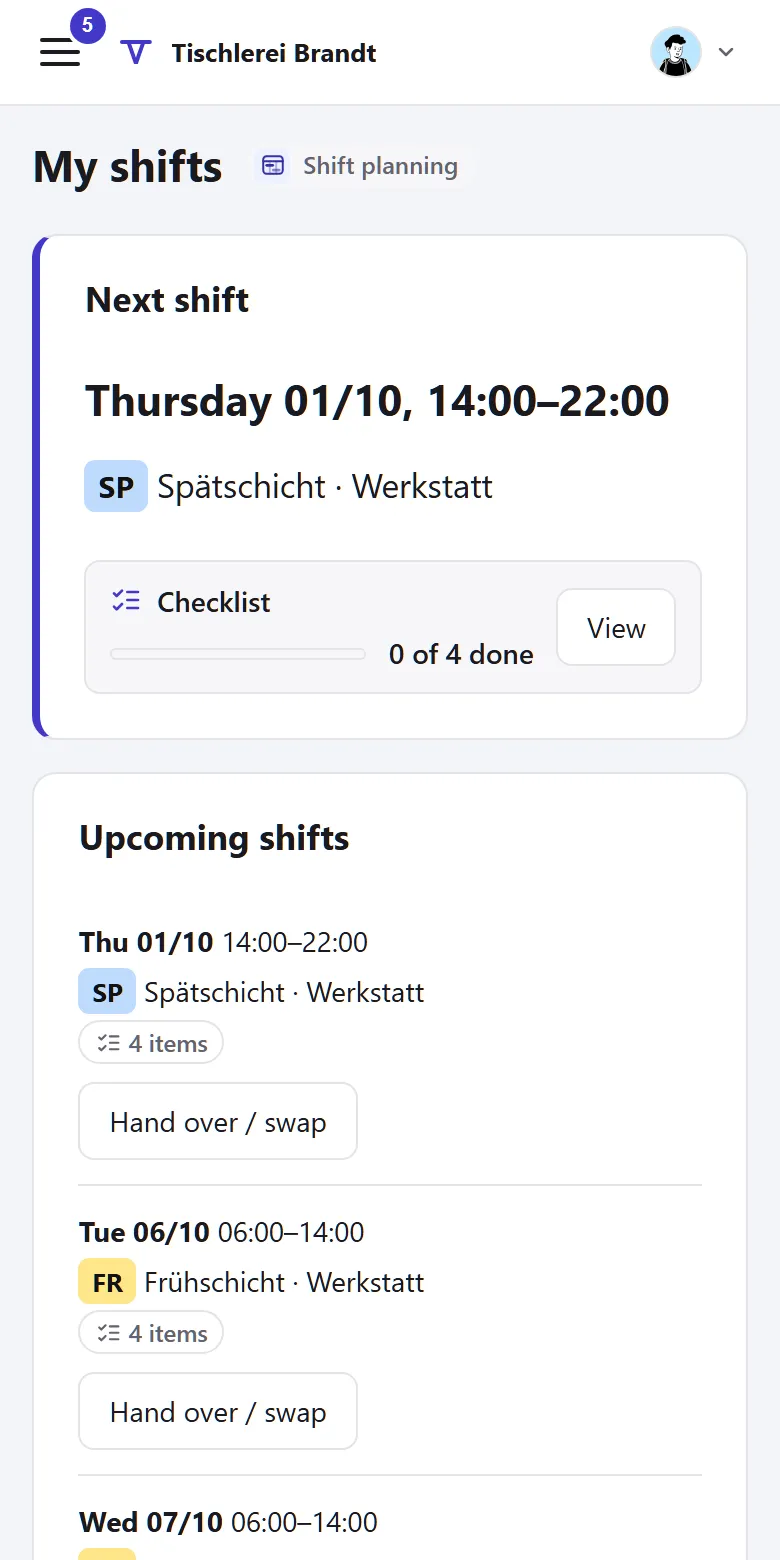
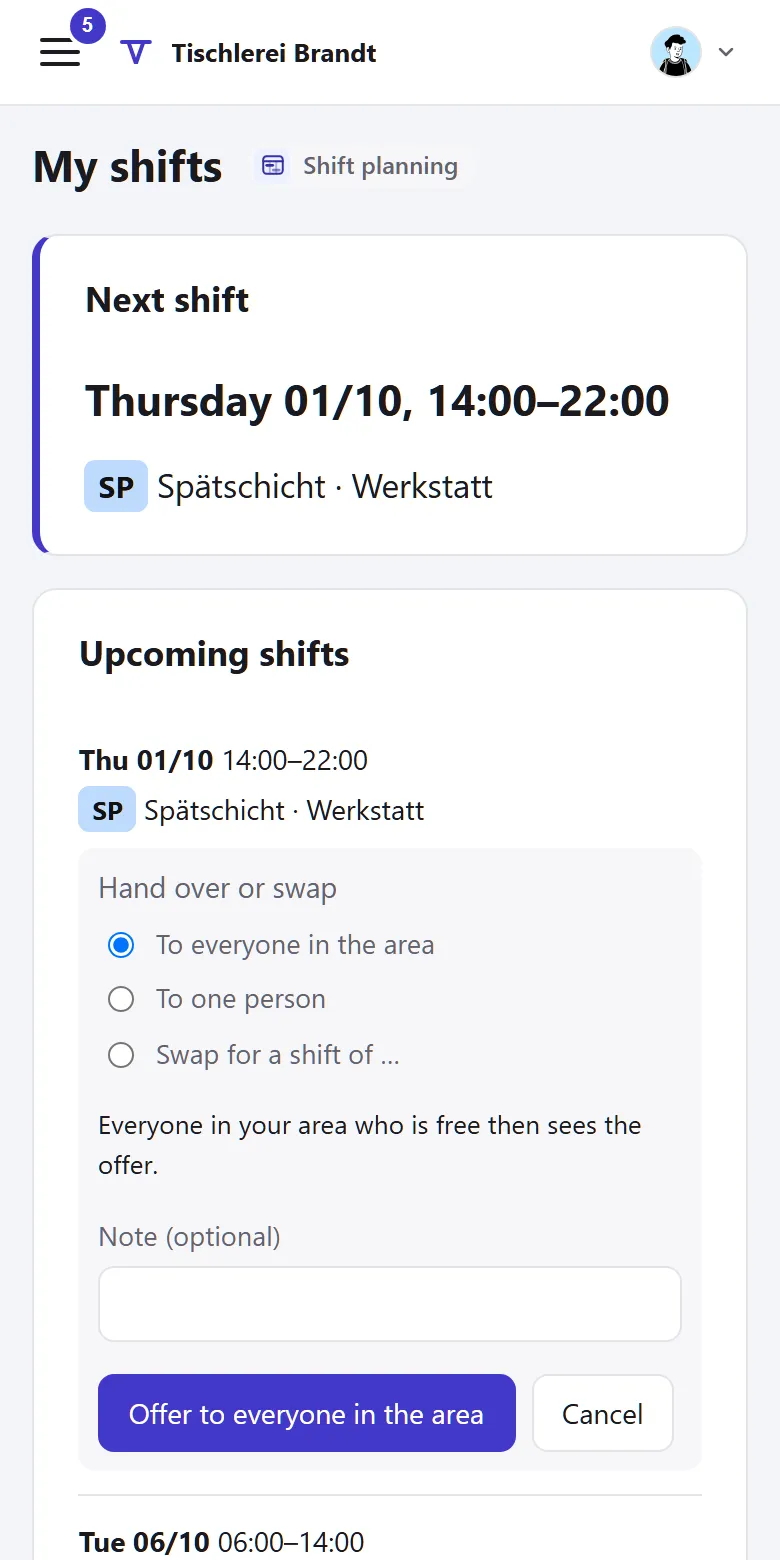
- Swaps with approval
The shift model of the template
Early and late duties overlap by half an hour, night and early by a quarter of an hour, for the handover. At weekends and on public holidays daytime demand is lower; at night it stays the same.
| Shift | Time | Break | Work | Demand (min · target · max) |
|---|---|---|---|---|
| Early duty | 6am–2pm | 30 min | 7.5 h | Mon–Fri: 3 · 4 · 5Sat–Public holiday: 2 · 3 · 4 |
| Late duty | 1:30pm–9:30pm | 30 min | 7.5 h | Mon–Fri: 3 · 4 · 5Sat–Public holiday: 2 · 3 · 4 |
| Night duty | 9:45pm–6:15am | 30 min | 8 h | Mon–Public holiday: 1 · 2 · 2 |
Min: below this the shift is understaffed. Target: the goal. Max: the limit up to which employees can sign up themselves.
You’ll find this template in Tiveo under Settings › Shift planning. It first shows what it would create: typical shift types, suggested demand, the building blocks of the planning method and, for a fixed cycle, an example pattern. It only adds what’s missing, and every setting can be changed later.
What applies in this industry
The Working Hours Act has its own rules for care and hospitals.
What applies, where it is written and what Tiveo does with it
-
In institutions for the treatment, care and support of people, the rest period may be up to one hour shorter if every reduction is made up within a calendar month or four weeks by a rest period of at least twelve hours.
In Tiveo: You set the shorter value with this legal basis, and the roster check uses it. Tiveo does not check the twelve-hour compensation; that remains the planners’ job.
-
Hospitals and care institutions may work on Sundays and public holidays; at least 15 Sundays a year must remain free of work.
In Tiveo: You set separate demand for weekends and public holidays. Tiveo does not count the free Sundays.
-
The working time of night and shift workers must be organised according to established findings of occupational science on humane work design.
In Tiveo: More than three night duties in a row appear as a note in the check report.
-
Pregnant and breastfeeding women may, as a rule, not be employed between 8pm and 6am.
In Tiveo: If the protective attribute is set for the person, the roster check reports such a duty. Planners only see a neutral note, never the attribute.
As of 26 September 2026. These sentences summarise the legal position and are not legal advice. Collective agreements and works agreements may provide otherwise.
What you will find in Tiveo
Absences
- Leave requests with their effect on the roster
- Sick leave: the duty is cancelled, the gap shows in the roster
- BEM list under § 167(2) SGB IX
Time recording
- Clock in on the phone or at the terminal in the staff room
- Night duty across midnight as one working day
- Night, Sunday and public holiday hours in the payroll export
Shift planning
- Requests: a day off or not this shift, up to four weeks ahead
- Open duties: whoever accepts first takes over
- Swaps with the planners’ approval
Qualifications
- Yearly hygiene briefing, required for everyone
- Resuscitation training with an expiry date
- “Care” template with first aiders and health and safety
Vehicle logbook
- Home visits with destination and purpose, clients shown only as a number if you wish
- A pool vehicle for each shift in the roster
- Mileage allowance for your own car, approved monthly
Planning needs a big screen
“My shifts”, swaps and open shifts fit on a phone, though.
How far ahead do carers enter their requests?
The template sets the request deadline to four weeks: up to 28 days before the day, employees enter “day off” or “not this shift”, important requests with a star. You set the deadline per area. A request is neither leave nor an entitlement.
What happens when the night duty calls in sick?
The duty is cancelled and stays on record, with a reason only the manager sees. Planners offer it as an open shift, and anyone free can take it if they want.
Do colleagues see why someone is absent?
No. They see “absent”; only managers and HR see the reason. The cancelled duty stays in the roster as a record.
Does every carer need their own account?
No. Anyone employed in the area can be planned, even without an account. Anyone without their own device clocks in at the terminal, or the manager adds the times with a reason.
All modules from Team
Core, absences and shift planning are included in every plan, time recording, qualifications and the vehicle logbook from Team, at no extra cost. What sets the plans apart is in the price table.
| Plan | Free | Team | Business | Company |
|---|---|---|---|---|
| Employees | up to 5 | up to 15 | up to 50 | up to 100 |
| Price per month | €0 | €19 | €59 | €119 |
| All modules | ✓ | ✓ | ✓ |
See the roster
The demo opens on shift planning with grid, demand and check report, no sign-up. In your own account you pick the “Care” template under Settings › Shift planning.