Skip to content
DE

Absences module

Online leave planner: from request to remaining leave

In many businesses, leave runs on a paper or email request, a list of days left and the wall planner in the corridor. Tiveo brings that together and gets right what is often worked out wrongly.

  • Pro rata under § 5 BUrlG
  • Reminder before leave expires, sending recorded
  • Public holidays per person by place of work
12 absence types as templates
3 days until the first reminder about open requests
Included in the price in every plan, at no extra cost

What each role asks

Employee

“How many days do I have left?”

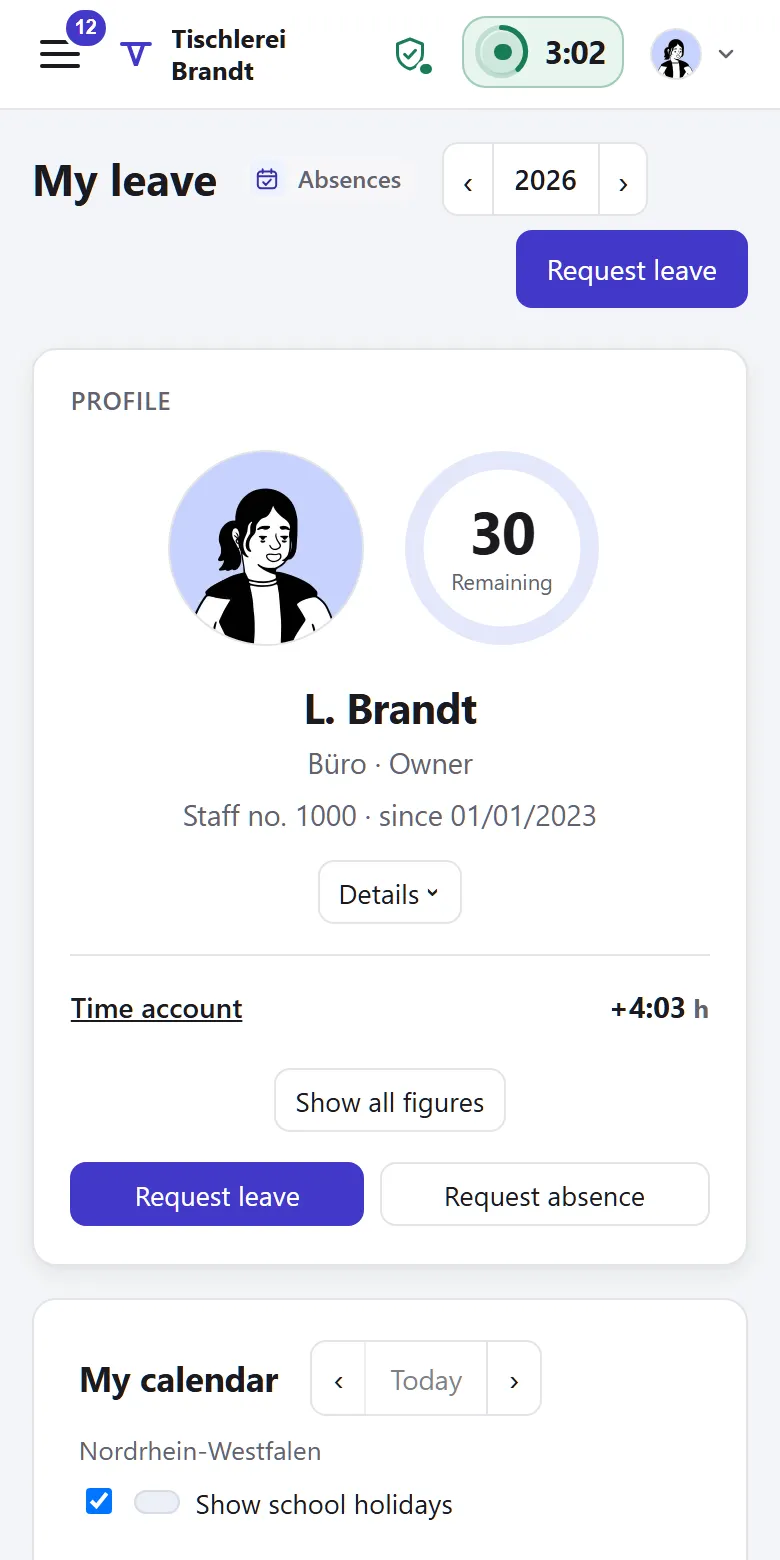
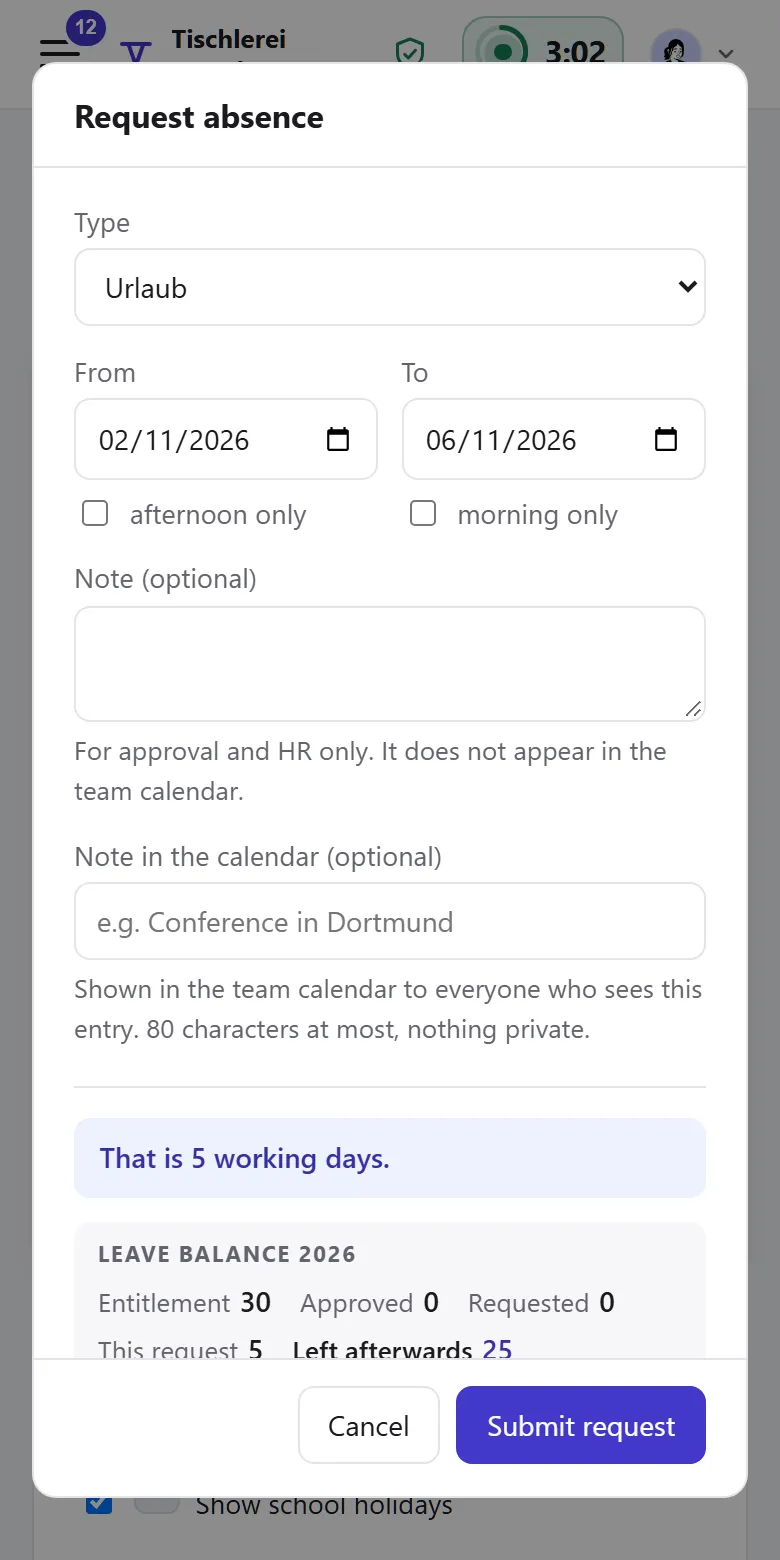
The request takes two clicks and shows your remaining days, who approves and who else is off.

Manager

“Who else would be away?”

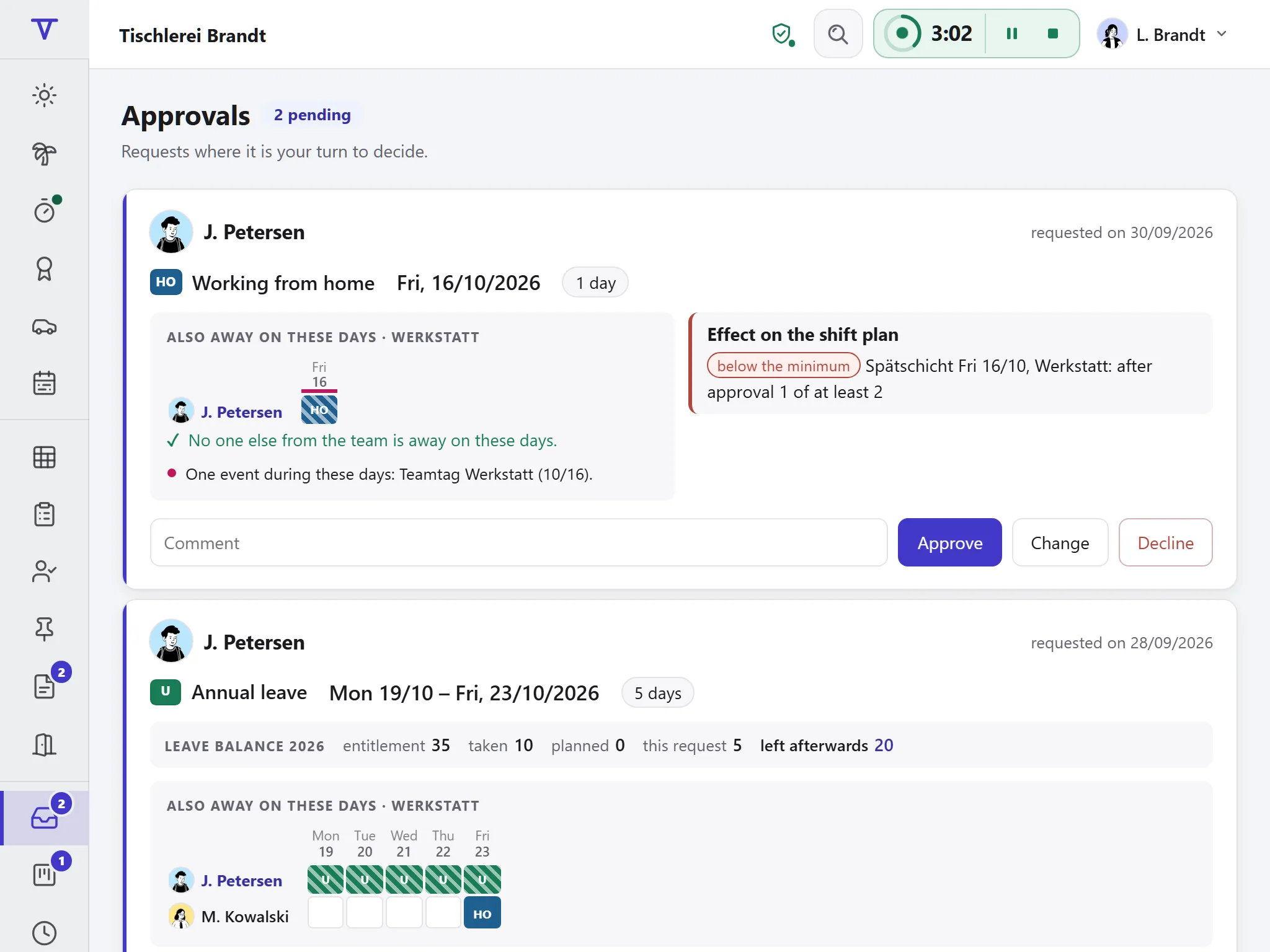
Every pending request on one page, the team beside it and the leave left afterwards.

HR

“Do the numbers add up at year end?”

Every figure in the leave account shows where it comes from.

How a leave request moves through Tiveo

  1. Request

    Pick type and dates, in the browser or on the phone. Holidays and part-time are already taken off.

  2. Approve

    You decide once who approves. Before saying yes, they see who else is away.

  3. Remaining leave adds up

    Entitlement, carry-over and remaining days are set per person, pro rata when people join or leave.

What the absences module does

Every calculation can be followed, from the request to year end.

Request and approval

Tiveo counts the working days with weekends, the holidays of the person’s region and their part-time pattern. Anything in the way shows before sending.

  • Half days at the start and the end
  • In the request: holidays, events, school holidays, who else is away and who approves
  • Warning for leave blocks and understaffing
  • Approve only part, such as starting a day later
Entitlements and remaining leave

Entitlement, carry-over, special leave and extra days, including the cases people often get wrong.

  • Pro-rata entitlement under § 5 BUrlG when joining or leaving
  • No cut to accrued leave when moving to part-time
  • No request beyond what is left; expiry only after a reminder
  • Accrual per month or per day of employment, as in construction

Approval rules

You decide who approves whose leave: by length, absence type, department or person, in several steps if needed. For example, the department head approves up to five days and the division head joins from six.

  • Several people, roles or heads per step; one or all must agree
  • A deputy while you are away, for earlier requests too
  • A shared inbox per step
  • HR sees where a request is waiting
A leave request of eight days passes through two approval steps: first the department head, then the division head. It then appears in the calendar.

Team calendar and company calendar

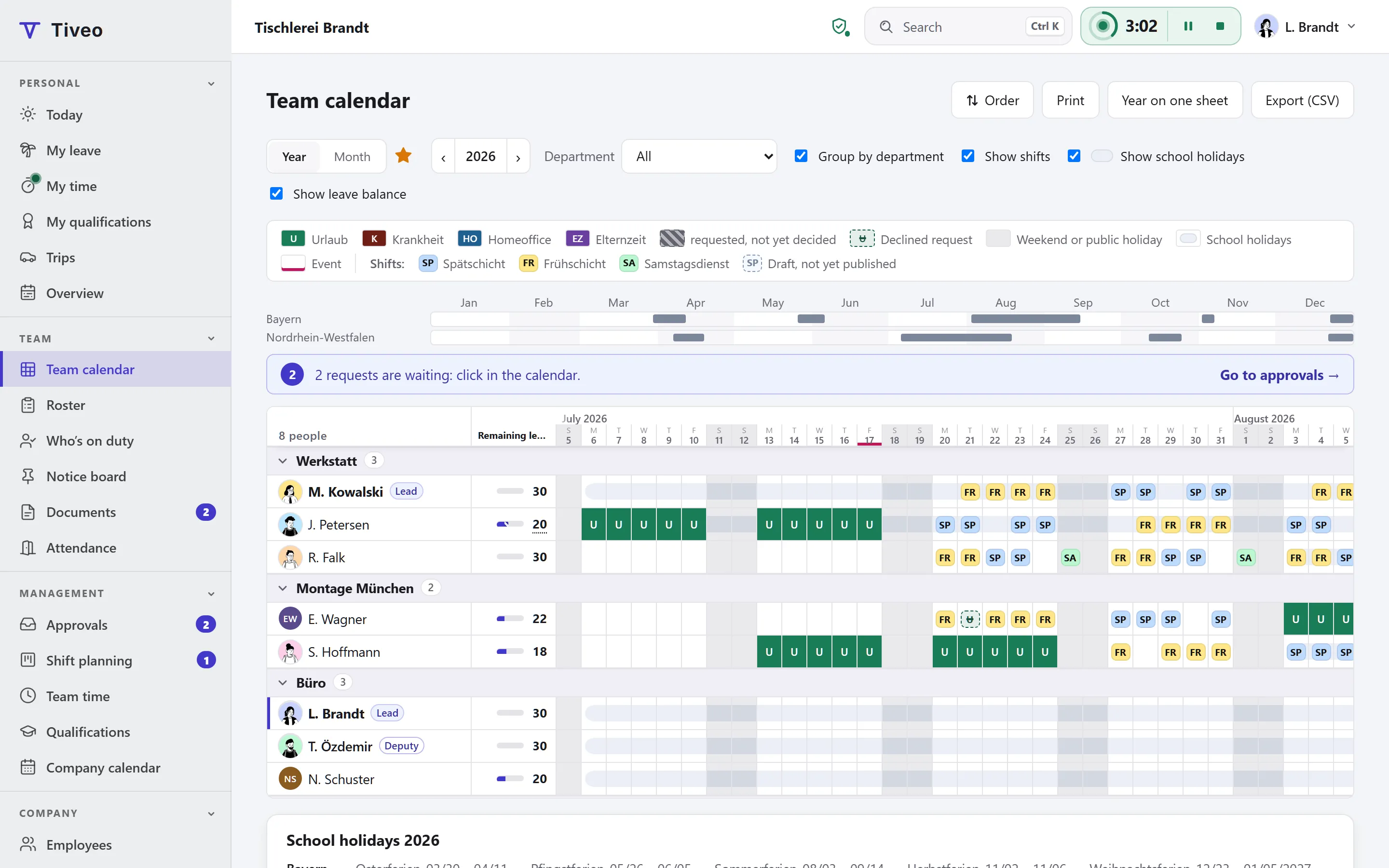
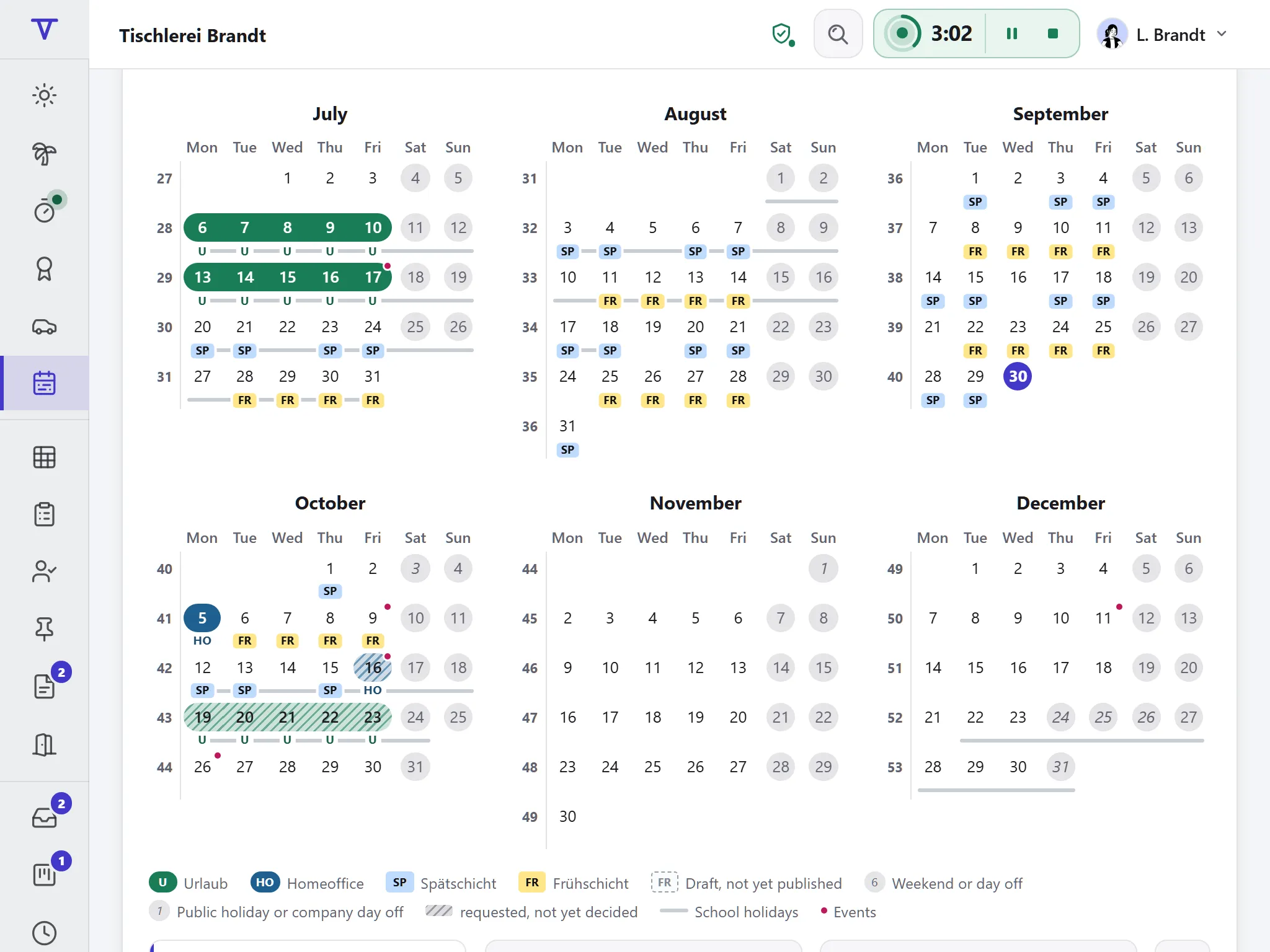
Rows are people and columns are days, with public and school holidays, events and, with shift planning, the shifts.

  • Minimum staffing per team
  • When planning for next year opens, per department if needed
  • You decide whom employees see: everyone, their team or only themselves
  • Quarterly print view and CSV for Excel

Sick leave and BEM

Sick notes sit in the same calendar, but only managers and HR see the reason.

  • Colleagues see “absent”, never the reason
  • Ill during leave: with a doctor’s note the days go back to the account
  • BEM list under § 167(2) SGB IX

More than holidays: absence types

Tiveo comes with 12 templates, each with its own colour, abbreviation and rules: whether it counts against the entitlement, needs approval or needs proof. From the Team plan you add as many of your own as you like.

  • Annual leave
  • Special leave
  • Sick leave
  • Child sick
  • Working from home
  • Business trip
  • Training
  • Flexitime day
  • Time off in lieu
  • Parental leave
  • Maternity protection
  • Unpaid leave

How absences work with the other modules

  • With time recording Leave, sick days and training count as worked; time off in lieu comes off the time account.

  • With shift planning The request shows what it means for the shifts. Once approved, they are cancelled and kept on record.

  • From the core Public holidays come from the place of work, approvers from the structure.

The law behind the leave calculation

The rules Tiveo calculates by, and where to find them.

What applies, where it is written and what Tiveo does with it
  1. The statutory minimum leave is 24 working days for a six-day week, which is 20 days for a five-day week.

    § 3 BUrlG

    In Tiveo: Tiveo calculates entitlement in working days, for part-time too.

  2. Anyone who joins or leaves during the year is entitled to one twelfth of the annual leave for every full month.

    § 5 BUrlG

    In Tiveo: Tiveo works out the pro rata share itself, and the full entitlement when someone leaves in the second half of the year.

  3. Leave only expires if the employer has pointed out the impending expiry in good time and specifically (CJEU, 6 November 2018, C-684/16).

    § 7(3) BUrlG

    In Tiveo: Switch it on, and from Team Tiveo emails the reminder to everyone with their own account and records the sending. People who are only in the calendar get it from you.

  4. If someone falls ill during their leave, the days of incapacity shown by a doctor’s certificate are not counted against the annual leave.

    § 9 BUrlG

    In Tiveo: Whoever enters the sickness ticks one box: Tiveo takes the days out of the leave, and they go back to the account.

  5. In construction and industries with many short employment relationships, collective agreements may deviate further from the Act, for instance by letting leave accrue per day of employment.

    § 13(2) BUrlG

    In Tiveo: The accrual model counts per month or per day of employment and shows in the request how much has accrued by then.

  6. If someone moves to part-time, leave already earned must not be reduced (CJEU, 22 April 2010, C-486/08).

    Art. 7 Directive 2003/88/EC

    In Tiveo: Tiveo calculates the entitlement per period of the working pattern.

  7. Anyone unfit for work for more than six weeks within a year must be offered occupational reintegration management by the employer.

    § 167(2) SGB IX

    In Tiveo: The BEM list shows HR who reaches the threshold.

  8. Leave management software is subject to co-determination.

    § 87(1) no. 6 BetrVG

    In Tiveo: The template works agreement describes in twelve sections what Tiveo processes, who sees what and what the data is not used for.

As of 1 October 2026. These sentences summarise the legal position and are not legal advice. Collective agreements and works agreements may provide otherwise.

What it costs

Free for up to five employees, above that priced by headcount. You can try every plan free for a month and cancel at the end of the billing period. Everyone you manage in Tiveo counts, with or without an account; people who have left, dormant records and future hires before their start date do not.

All plans and features compared →

Plan FreeTeamBusinessCompany
Employees up to 5up to 15up to 50up to 100
Price per month €0€19€59€119
Absences ✓ ✓ ✓ ✓

Common questions

If your question isn’t here, ask the developers directly.

Ask a question
What is the difference between leave management and an absence planner?

Day to day, not much. Leave management stresses entitlement, remaining leave and approval; an absence planner stresses the calendar, which also shows sick leave, working from home or business trips. Tiveo is both in one application.

Does everyone need an account?

No. You can add people and plan for them without anyone registering. They still count towards your plan, like every employee with or without an account.

How does the data from our Excel list get in?

By import: Tiveo reads people, teams, entitlements, remaining leave and existing entries from your Excel file or a CSV. Before anything is taken over, a test run shows line by line what would be created.

Can colleagues see why someone is away?

For every absence type you decide who sees the reason. For sick leave the default is: colleagues see “absent”, only the manager and HR see the reason. You also choose whom employees see in the team calendar at all: everyone, only their team or nobody. The software enforces this technically.

Can managers enter leave for their team?

Yes, once the administrators switch it on, for the whole company or for single departments. Heads and deputies then enter absences for their people in the team calendar, as a request or approved straight away, and withdraw entries, though never for themselves. Switch on the email for it from Team, and everyone with an account hears about every entry.

See for yourself

The demo shows Tiveo with sample data, without signing up: requests, approvals, team calendar and leave accounts of a joinery with eight people.