Skip to content
DE

Qualifications module

Qualifications and safety briefings: who has what and what expires

First aiders, forklift licences, the yearly safety briefing, training points: Tiveo shows for each person what is valid, what expires soon, what is missing and who has confirmed a briefing.

  • Status per person and type: valid, expiring soon, expired, missing
  • Briefings confirmed in the app or recorded on paper
  • Medical checks with the date only, never a finding
5 categories, from qualification to instruction
30 days warning before a record expires, adjustable per type
Included in the price from Team, at no extra cost

What each role asks

Employees

“What do I have to prove, and by when?”

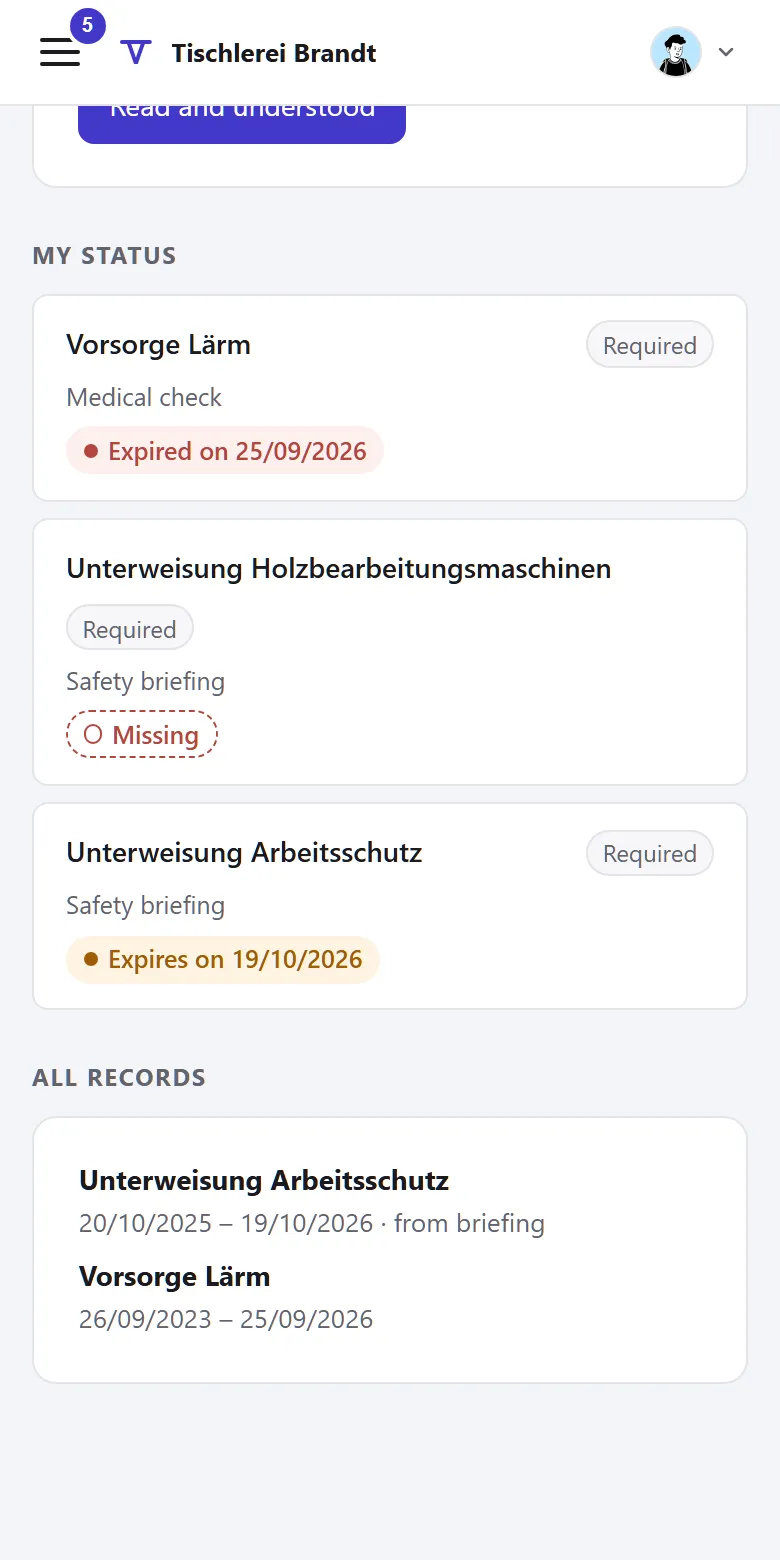
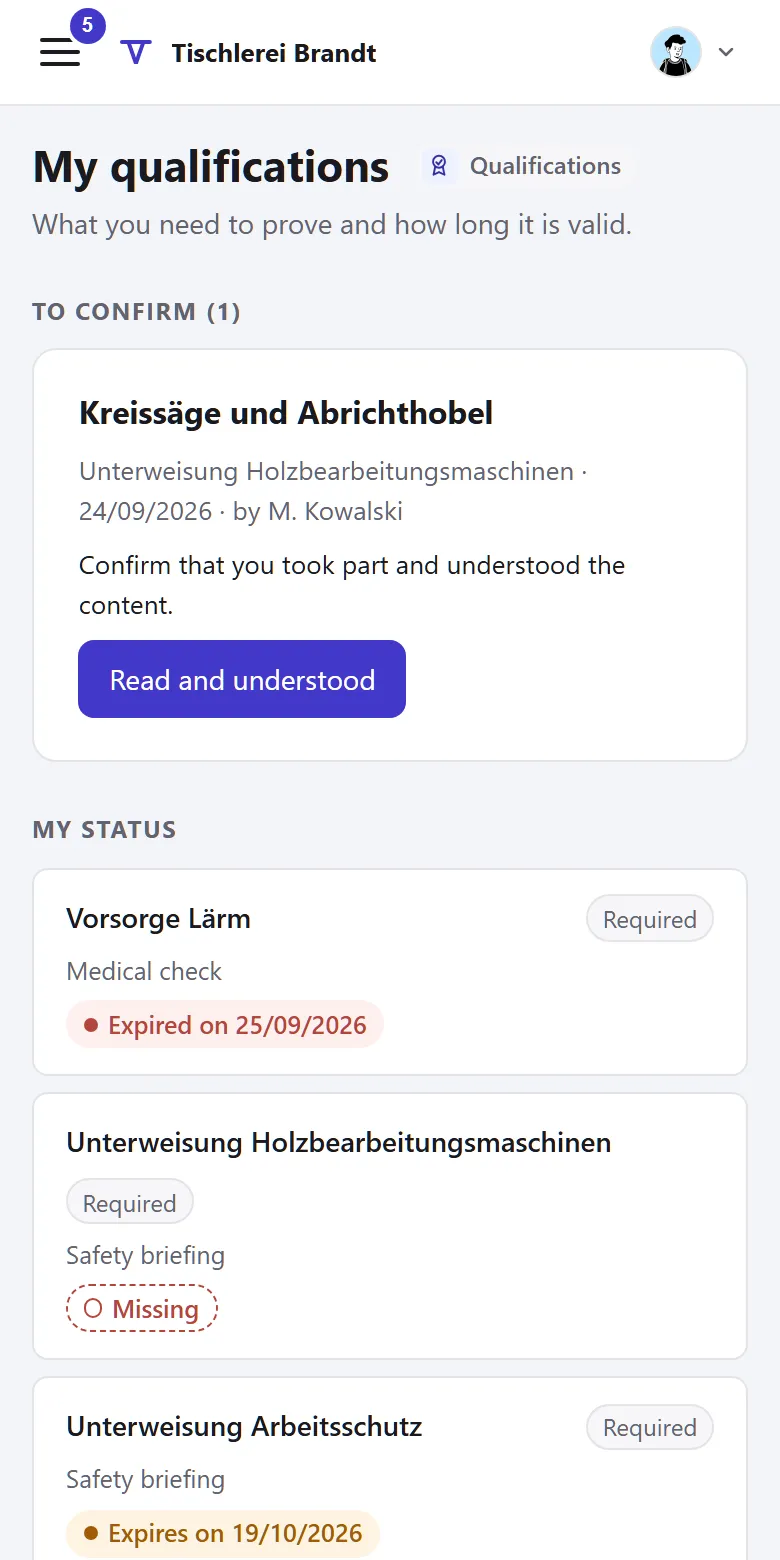
“My qualifications” shows your own status. You confirm briefings there and add training yourself.

Managers

“Is my team up to date?”

The overview shows your own people: what is valid, what expires soon, what is missing.

HR and administration

“Which records do we keep?”

Create types with deadlines and requirements and record briefings for all employees.

How a safety briefing moves through Tiveo

  1. Record

    Date, topic and who gave it. Everyone who needs it is already selected.

  2. Confirm

    Each person confirms in the app: read and understood. Or you record the signature on paper.

  3. Repeat in time

    The record is valid until the next repetition. As it approaches, it shows as “expiring soon”, with an email to the person if you like.

What the qualifications module does

Records that used to sit in folders now come with deadlines.

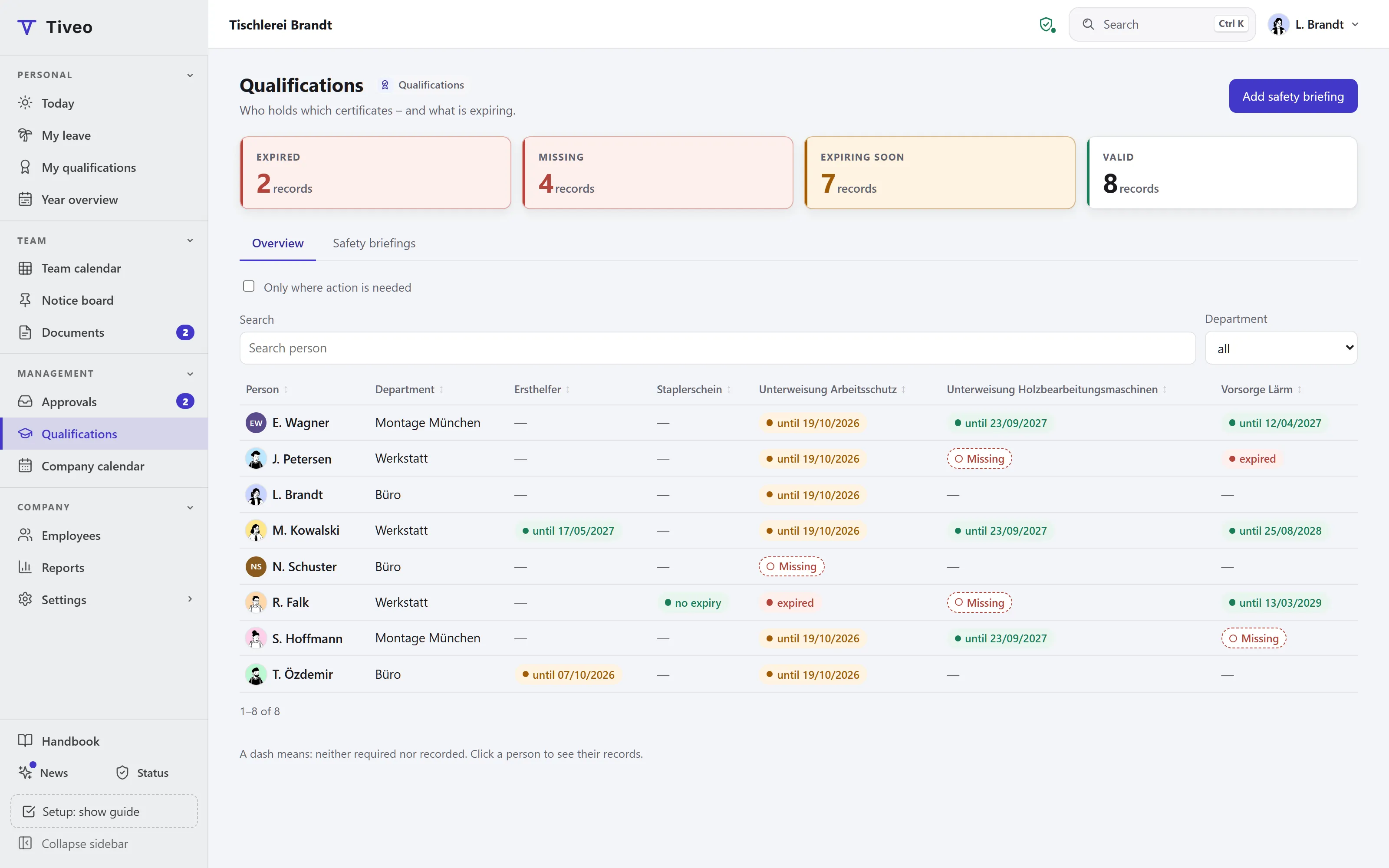
Overview: who has what

People in rows, types in columns. Each cell shows the status: valid, expiring soon, expired or missing.

  • Key figures above: expired, missing, expiring soon, valid
  • Filter “Only where action is needed”
  • Click a person to see their records
  • Every Monday by email to managers and HR, if you like
Briefings with confirmation

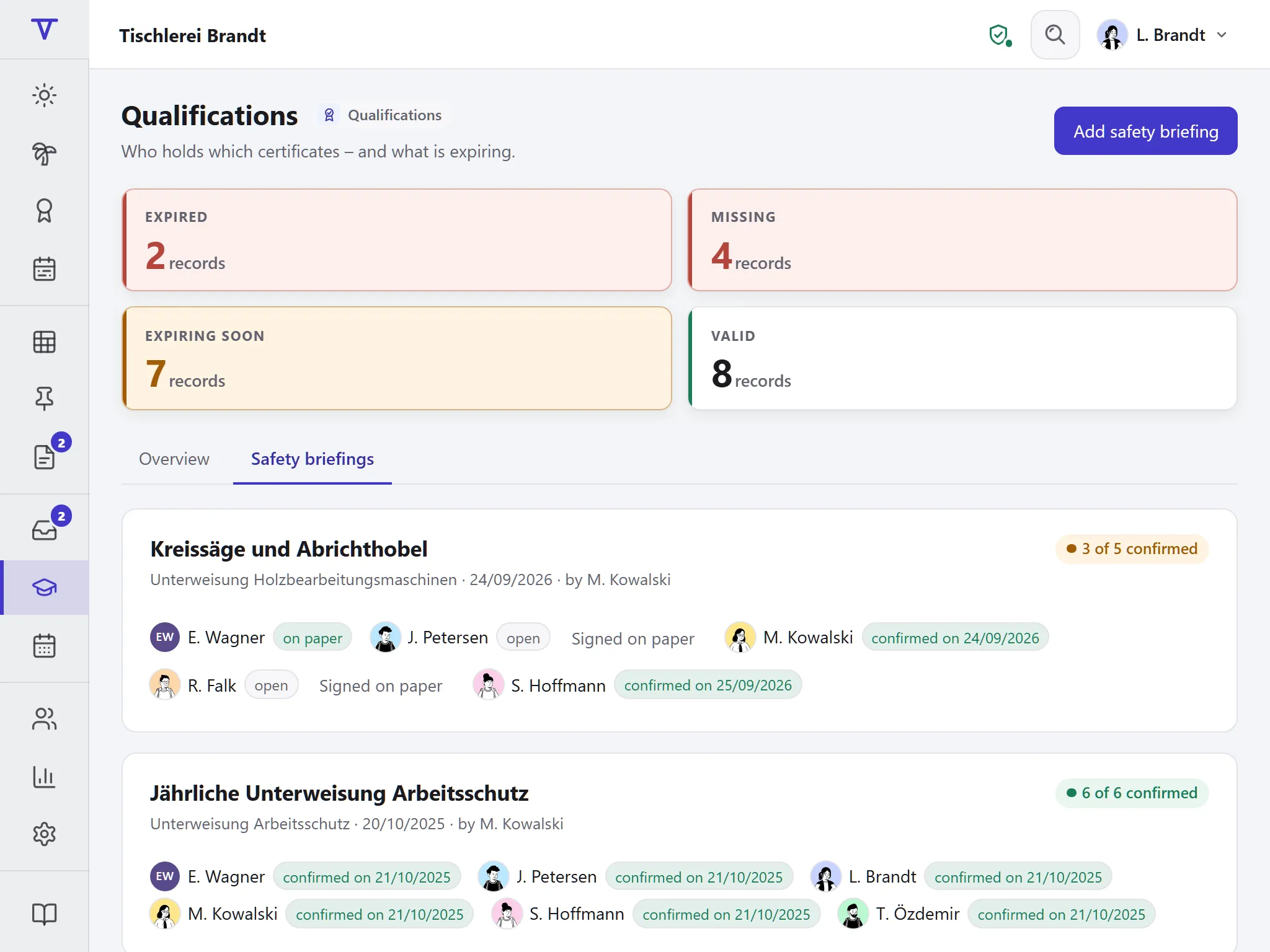
Enter date, topic and “given by” once. Everyone who needs the briefing is preselected.

  • Confirmation in the app: “Read and understood”
  • Or signed on paper, recorded per person, later too
  • Also for employees without an account

Types, deadlines and requirements

Five categories: qualification, safety briefing, training, medical check and instruction. Per type you set the deadline, the warning and who needs it.

  • Valid until it expires, such as first aiders for 24 months, or unlimited like a forklift licence
  • Required for everyone or per department, including the departments below
  • Warning 30 days ahead by default

Training points over a period

Points within a period, such as 60 points in four years in physiotherapy. Counted backwards from today.

  • Status as “x of y points”
  • Employees add their own training themselves
  • Course or provider as a note

Templates per industry

Construction and scaffolding, medical practice, physiotherapy, care, hospitality or general: the template creates the usual types, adding only what is missing.

  • The deadlines are suggestions; your risk assessment decides
  • Names, deadlines and requirements stay editable
  • Retired types keep their records

Who sees what

Employees see their own records, managers their team, HR everyone. For medical checks only the date is kept, never a finding.

  • A file on a record (PDF, JPG, PNG up to 10 MB) is visible only to the person and HR
  • Administrators and HR create the types
  • Every change in the audit log
  • Included in the full export and in data deletion

How qualifications sit next to the other modules

  • From the core People, departments and roles: a requirement applies to the department and everything below.

  • Next to absences Enter the day of a training course as an absence and the points as a record.

  • Next to shift planning A shift type can require a qualification. If a scheduled person lacks it, the plan check warns.

The law behind the records

What employers have to brief, instruct and keep on record.

What applies, where it is written and what Tiveo does with it
  1. Employees must be briefed adequately on safety and health at work, when they start and when things change; the briefing has to be repeated regularly where necessary. DGUV Regulation 1 requires it at least once a year, documented.

    § 12 ArbSchG, § 4 DGUV Regulation 1

    In Tiveo: A briefing carries date, topic and participants; each person confirms in the app or on paper. The templates use twelve months.

  2. Anyone working with food commercially has to be instructed on the bans on working and the reporting duties after starting and every two years after that; attendance has to be documented.

    § 43(4) IfSG

    In Tiveo: Instruction is a category of its own; the hospitality template uses 24 months.

  3. For occupational medical checks the employer keeps a record: that, when and for which reason a check took place.

    § 3(4) ArbMedVV

    In Tiveo: The medical check category only knows the date. There is no field for findings.

  4. If a business keeps employees’ records in software, the works council may have a say.

    § 87(1) no. 6 BetrVG

    In Tiveo: Who sees what follows the role: employees their own records, managers their team, HR everyone.

As of 14 October 2026. These sentences summarise the legal position and are not legal advice. Collective agreements and works agreements may provide otherwise.

Included in the price

Qualifications cost nothing extra: they are included in every paid plan, from Team. What sets the plans apart is in the price table.

All plans and features compared →

Plan FreeTeamBusinessCompany
Employees up to 5up to 15up to 50up to 100
Price per month €0€19€59€119
Qualifications ✓ ✓ ✓

Common questions

If your question isn’t here, ask the developers directly.

Ask a question
Does Tiveo replace the risk assessment?

No. Which briefing is needed how often follows from your company’s risk assessment. The deadlines in the templates are suggestions; you adjust them per type.

Does Tiveo send a reminder before a record expires?

Yes, once you switch the emails on under Settings › Emails; they are off by default. Everyone with an account then gets an email when a record enters its warning period and when it expires. Every Monday, managers get an overview of their area, HR and administrators one of the whole company: what expires soon, has expired or is missing. The same occasions arrive as push notifications on request.

How do employees without an account confirm a briefing?

On paper. You record the signature per person in Tiveo, later too. Anyone with their own account confirms in the app: “Read and understood”.

Does Tiveo store findings from occupational medical checks?

No. The medical check category only knows the date. There is no field for findings or diagnoses.

Who sees the records?

Employees see their own, managers those of their team including the departments below, HR everyone. Administrators and HR create the types. A file on a record (PDF, JPG or PNG up to 10 MB) is visible only to the person and HR.

See for yourself

The demo opens on the overview of a joinery: the yearly briefing, first aiders, forklift licences and deadlines that run out soon, with no sign-up.