Industries Practices & therapy
Leave planning for practices: who is off, who stays, who approves
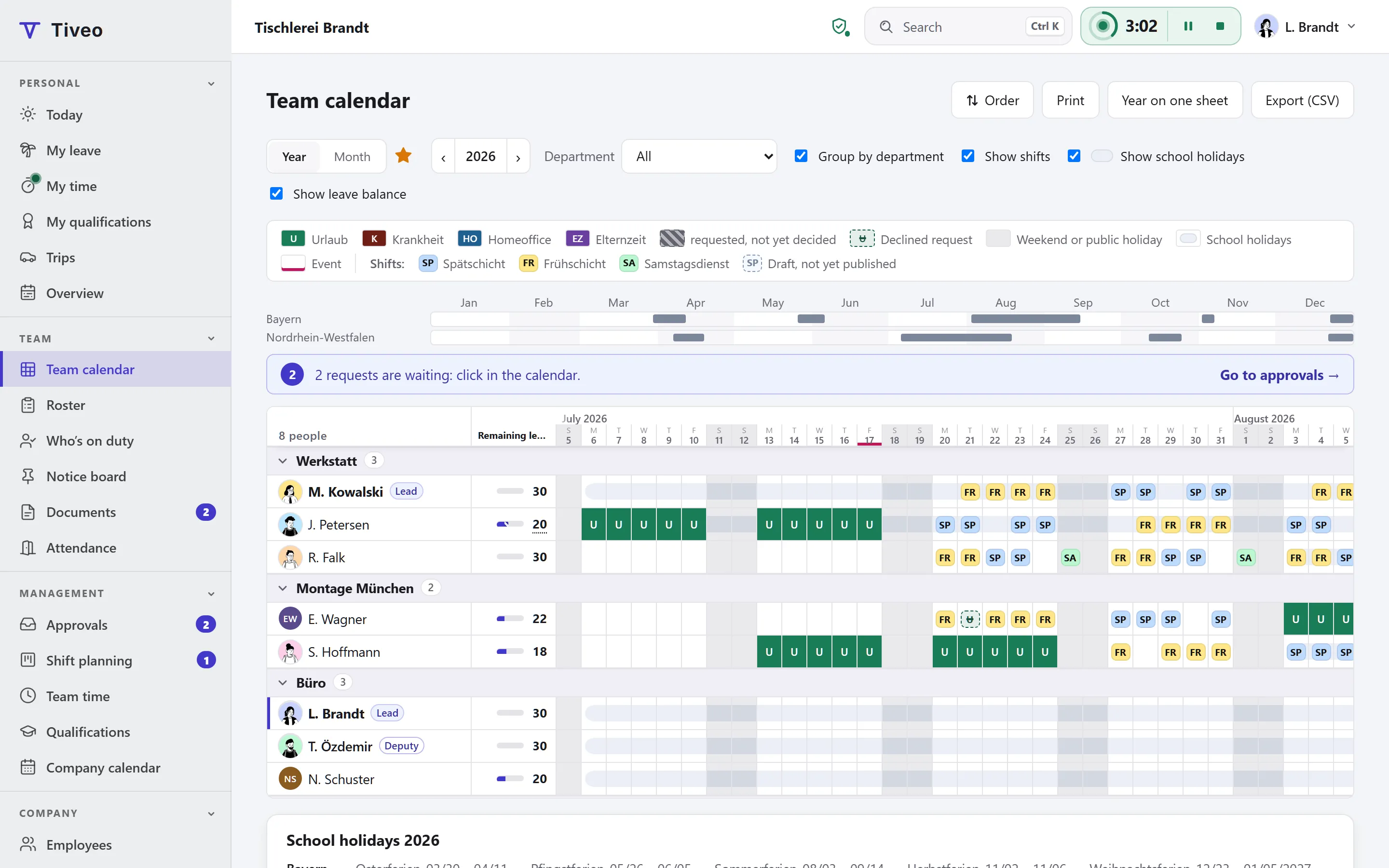
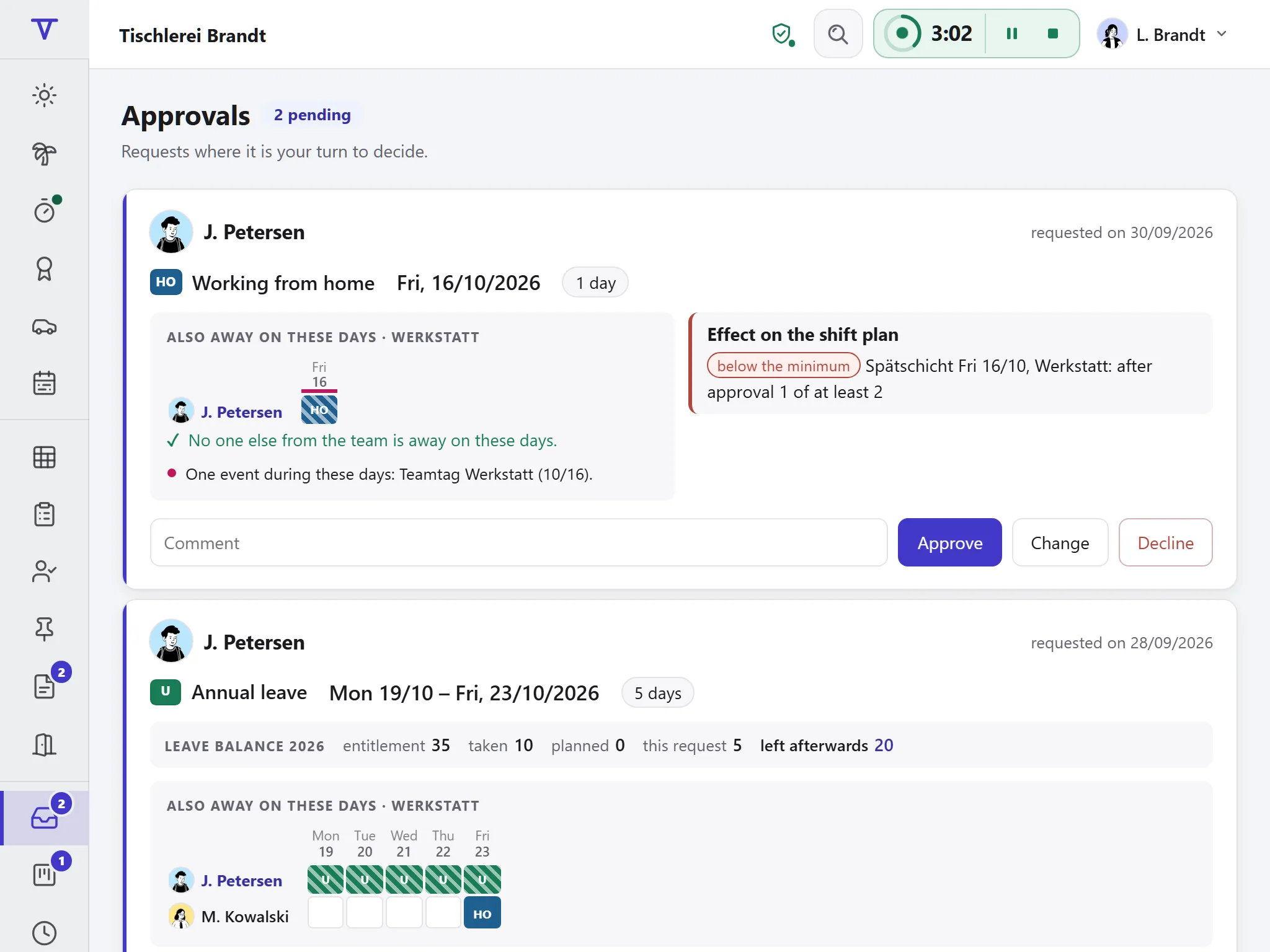
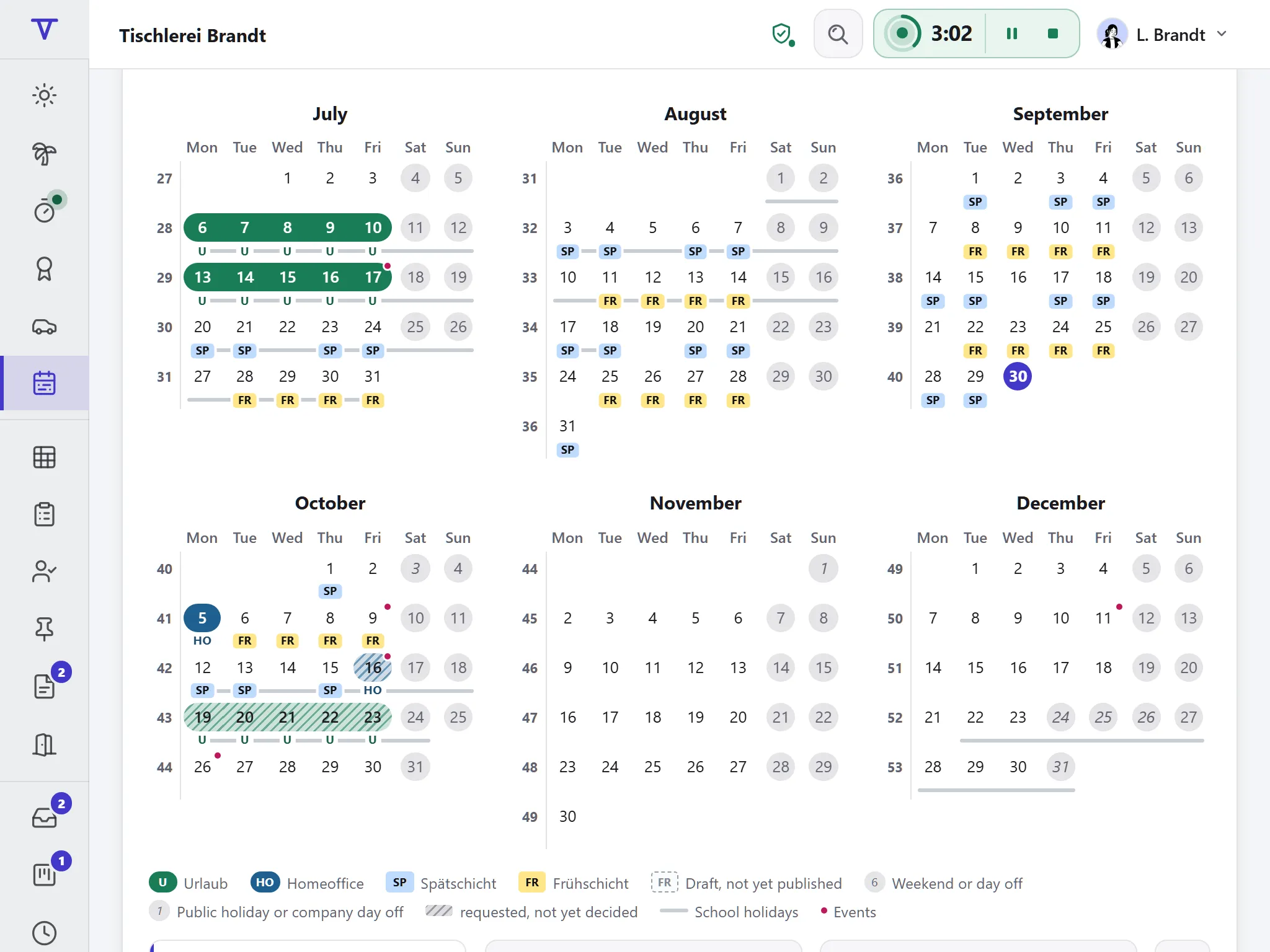
A practice needs someone on the front desk every day, summer holidays included, when everyone with children wants the same weeks off. Every request in Tiveo shows who else is away at that time. Half days and part-time are handled, and training has its own absence type.
- Requests show who else is away, plus school and public holidays
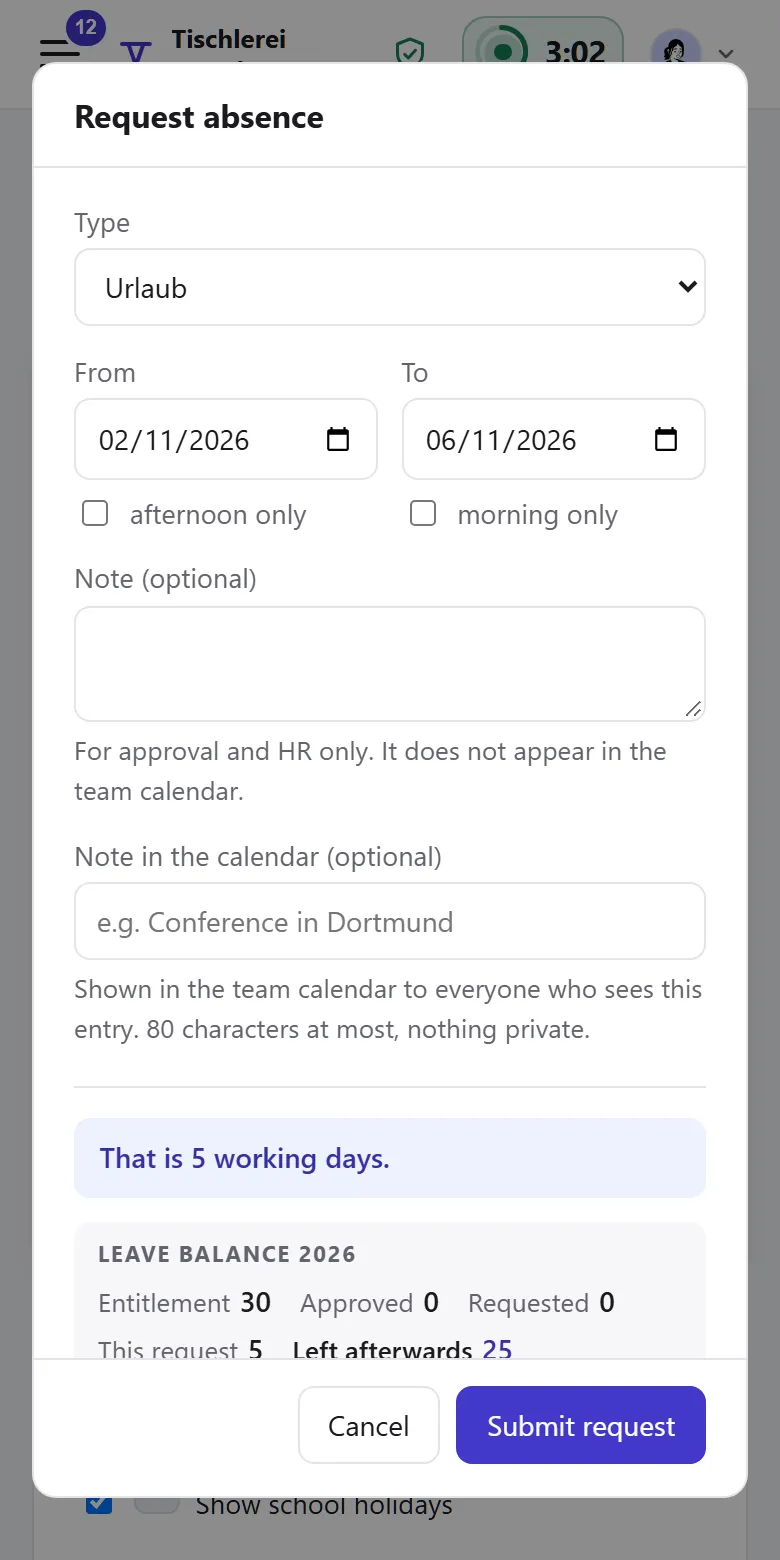
- Half days, part-time, special leave and training
- The deputy approves when the manager is away
Absences module
Plan leave without leaving the front desk empty
What matters for leave in a practice.
-
Staffing
From the Team plan, a rule per team warns or blocks when too many people would be off at once.
-
Cover
Manager and deputy approve with equal rights. The request shows who else is away.
-
Half days
Leave can start at midday and end at midday.
-
Special leave and training
For each type you choose a colour and decide whether it comes off the entitlement and who approves.
-
School holidays
The request and team calendar show them, so clashes appear before anyone books.
-
Part-time
Tiveo only deducts the days the person actually works. Public holidays in their region don’t count.
If you plan shifts
Many practices don’t need a roster, as opening hours are fixed and leave and time recording are enough. If you split mornings and afternoons, use the “Medical practice” template: the manager assigns, gaps go out to the team as open shifts.
Template: Medical practice
- Morning 7:30am–1pm
- Afternoon 1pm–6:30pm
Managers plan: Planners assign shifts; gaps go out to everyone in the area as open shifts.
Friday afternoon is closed, as in many practices.
What applies in this industry
The Federal Leave Act governs when leave is granted, in small practices too.
What applies, where it is written and what Tiveo does with it
-
When leave is scheduled, employees’ wishes must be taken into account unless urgent operational needs or the wishes of others who deserve priority on social grounds stand in the way.
In Tiveo: Request and approval show who else is away; from the Team plan, a staffing rule warns or blocks. Who has priority is the manager’s decision.
-
The statutory minimum leave is 24 working days for a six-day week, or 20 days for a five-day week.
In Tiveo: Tiveo calculates entitlement in working days, for part-time too.
-
If someone falls ill during their leave, the days of incapacity shown by a doctor’s certificate are not counted against the annual leave.
In Tiveo: Whoever records the sickness ticks a box. Tiveo then takes those days out of the leave and puts them back on the balance.
-
Employers must introduce a system that records the start and end of daily working time including overtime (Federal Labour Court, decision of 13 September 2022, 1 ABR 22/21).
In Tiveo: With time recording, employees clock in on the phone, in the browser or at a terminal at the front desk.
As of 14 October 2026. These sentences summarise the legal position and are not legal advice. Collective agreements and works agreements may provide otherwise.
What you will find in Tiveo
Absences
- Staffing rule per team, from the Team plan
- Half days, special leave and training as types of their own
- Practice holidays as mandatory leave for everyone
Time recording
- Clock in on the phone or at a terminal at the front desk
- Mini-jobs: late entries within seven days, as in § 17 MiLoG
- Time account with the target from weekly hours
Shift planning
- “Medical practice” template: morning and afternoon
- The manager assigns, gaps go out to the team as open shifts
Qualifications
- Training points with a target and period, such as 60 in four years
- Hygiene briefing required for everyone
- Radiation protection expertise with an expiry date
Vehicle logbook
- Home visits in the logbook, patients shown only as a number if you wish
- Mileage allowance for your own car, approved monthly
On the phone and at the desk
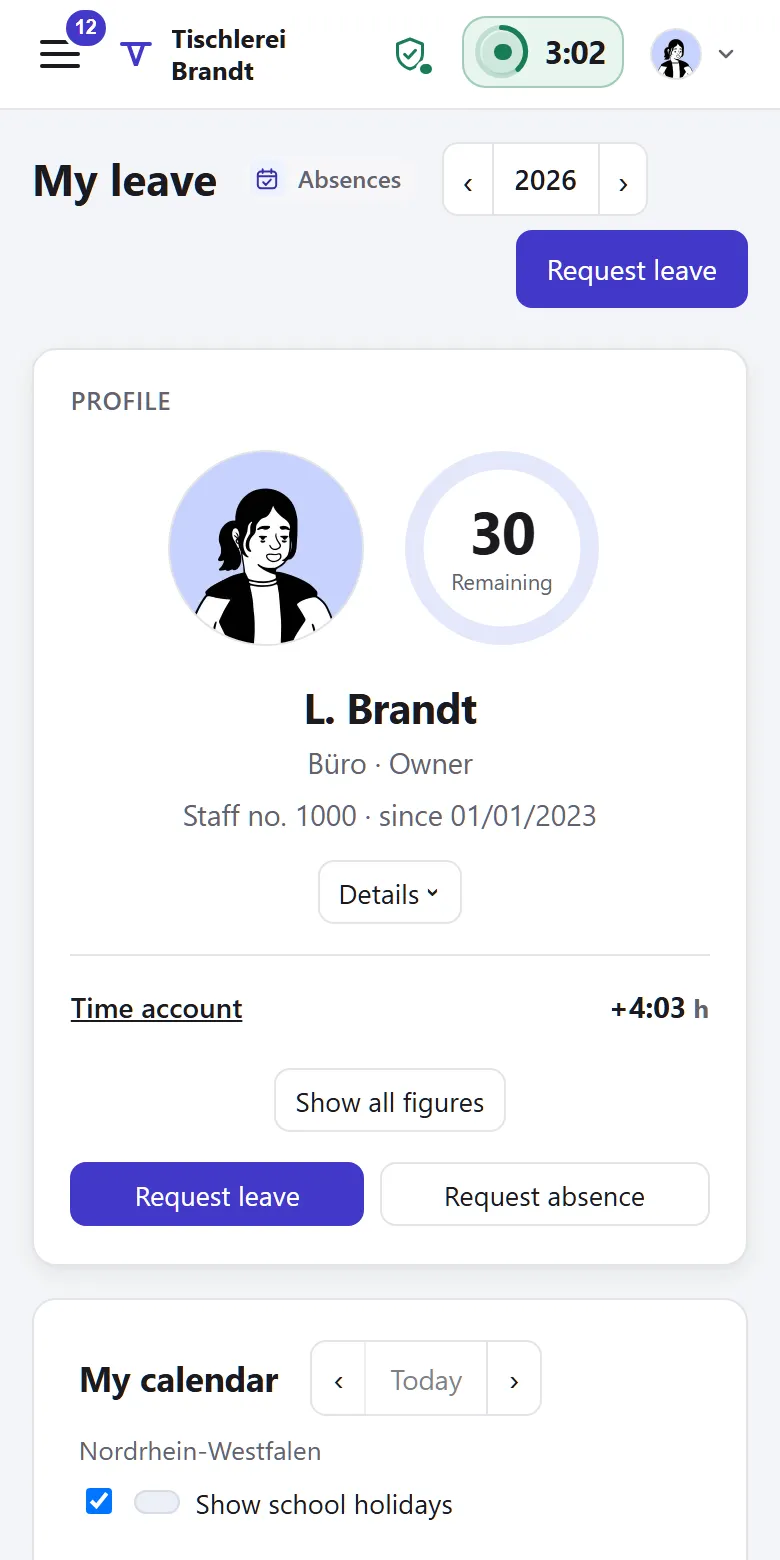
Leave gets requested from the sofa in the evening and approved between two meetings, in the same application and with nothing to install.
How do we stop everyone being away at once in the summer holidays?
From the Team plan, with a staffing rule per team, such as “at most two away at the same time”: Tiveo warns on the request or does not let it be sent at all. School holidays show in the request and in the team calendar. A leave block keeps periods such as quarter-end free, as a note or hard block.
Who approves when the practice manager is on leave?
The deputy. Manager and deputy of a department have equal rights: both can approve requests, and when the manager requests leave, the deputy decides.
Can someone take half a day off?
Yes. The first day can be afternoon only, the last day morning only. Whether half days are possible is your setting, for the practice and per absence type.
How do we record training?
As an absence type of its own. Training is one of the 12 templates and has its own colour. You decide whether it counts against leave and whether it needs approval or proof.
Do we need a roster?
Usually not. If the opening hours are fixed, leave, sick days and time recording are enough. If you assign mornings and afternoons, switch on shift planning at no extra cost and pick the “Medical practice” template.
All modules from Team
Core, absences and shift planning are included in every plan, time recording, qualifications and the vehicle logbook from Team, at no extra cost. What sets the plans apart is in the price table.
| Plan | Free | Team | Business | Company |
|---|---|---|---|---|
| Employees | up to 5 | up to 15 | up to 50 | up to 100 |
| Price per month | €0 | €19 | €59 | €119 |
| All modules | ✓ | ✓ | ✓ |
See the team calendar
The demo shows requests, approvals and the team calendar with sample data. If you plan shifts later, the “Medical practice” template is under Settings › Shift planning in your own account.